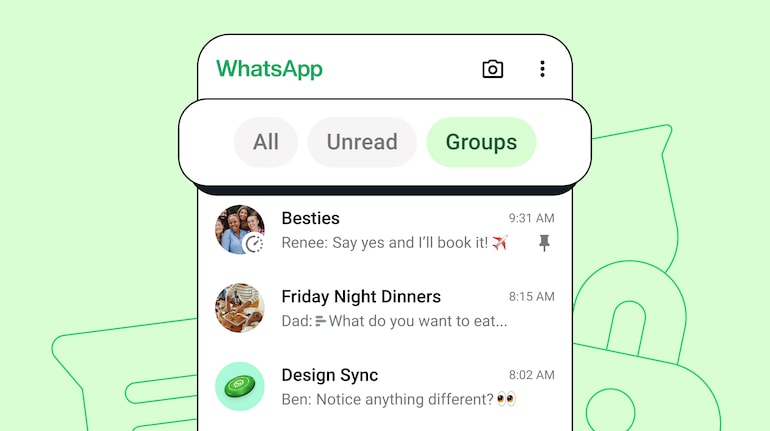
WhatsApp has emerged as the de-facto communication app for billions of people across the world. Be it for communicating with friends, or for office work, or getting updates from businesses, WhatsApp is one of the most used apps on smartphones. What it also means is that there are hundreds of chats/conversations in your WhatsApp. Sometimes searching for messages can be a bit of a pain. WhatsApp is addressing a growing need for better chat management, particularly for users with extensive contact lists. Enter chat filters. Chat filters allows users to navigate their inboxes with greater ease.
WhatsApp will now have three chat filters: All, Unread, and Groups. You can find these filters at the top of your chats, and can be applied by tapping or clicking on them. Or you can simply swipe left or right to switch between filter views.
How to use WhatsApp chat filtersWhen a filter is selected, it will be highlighted. Filters remain applied until you change the filter view, or exit and re-open WhatsApp. Do keep in mind that filter names are pre-set and can’t be changed. All chats with unread messages are added to the Unread view, while your group chats are added to the Groups view. Chats can’t be recategorised or organised within these filters, says WhatsApp
Follow these steps to search for messages using chat filters:
Step 1: Launch WhatsApp on your phone.
Step 2: Navigate to the "Chats" tab. It's usually located at the bottom of your screen.
Step 3: Sort by all chats: If you want to see your entire chat history, simply tap the "All" filter at the top of your chat list. This is the default view.
Step 4: Focus on unread messages: To prioritise catching up on missed chats, tap the "Unread" filter. This will display only conversations with unread messages.
Step 5: Jump to group chats: Need to access your group discussions quickly? Tap the "Groups" filter. This will show all your group chats.
Also read: How to use Meta AI on WhatsApp, Instagram: Step-by-step guide


Discover the latest Business News, Sensex, and Nifty updates. Obtain Personal Finance insights, tax queries, and expert opinions on Moneycontrol or download the Moneycontrol App to stay updated!
Find the best of Al News in one place, specially curated for you every weekend.
Stay on top of the latest tech trends and biggest startup news.