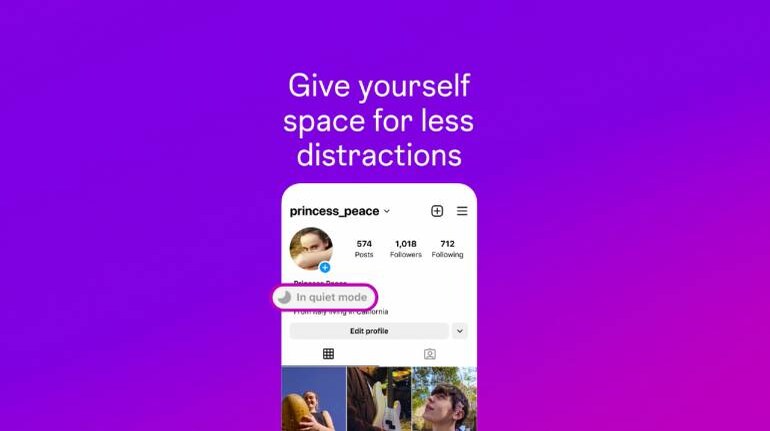
Instagram recently rolled out a new feature called ‘quiet mode’. Instagram’s new feature is currently only available in limited regions including the United States, United Kingdom, Ireland, Canada, Australia, and New Zealand. However, the Meta-owned platform confirmed that ‘queit mode’ would be available to a wider audience soon.
Instagram’s new feature is aimed at helping people take a break from the app and set boundaries with their friends and followers. Once ‘quiet mode’ is enabled, users won’t receive any notifications. Additionally, users’ profile activity status will change to let people know and Instagram will automatically send an autoreply when someone sends a direct message.
Instagram claims that the feature is directed towards teens, who are having problems taking breaks from the platform. The official blog post announcing the feature reads, “Teens have told us that they sometimes want to take time for themselves and might be looking for more ways to focus at night, while studying and during school.”
How to use Quiet Mode on Instagram?
The Quiet Mode option will appear under your profile picture. Once you select it, head on over to the option to toggle it on and set a time when you want the feature to be enabled.
Quiet mode hours can be customised to fit a user’s schedule. While Quiet mode is aimed at teens, although all users can access the feature. However, teenagers will be prompted to activate the feature after sending a specific amount of time on Instagram late at night.
Apart from ‘quiet mode’, Instagram is also introducing tools to personalise recommendations and offer more parental controls. Users can tag posts on the ‘Explore’ tab as ‘not interested’ to avoid seeing similar content in the future. In its blog post, Instagram said, “These updates are part of our ongoing work to ensure people have experiences that work for them, and that they have more control over the time they spend online and the types of content they see.”


Discover the latest Business News, Sensex, and Nifty updates. Obtain Personal Finance insights, tax queries, and expert opinions on Moneycontrol or download the Moneycontrol App to stay updated!
Find the best of Al News in one place, specially curated for you every weekend.
Stay on top of the latest tech trends and biggest startup news.