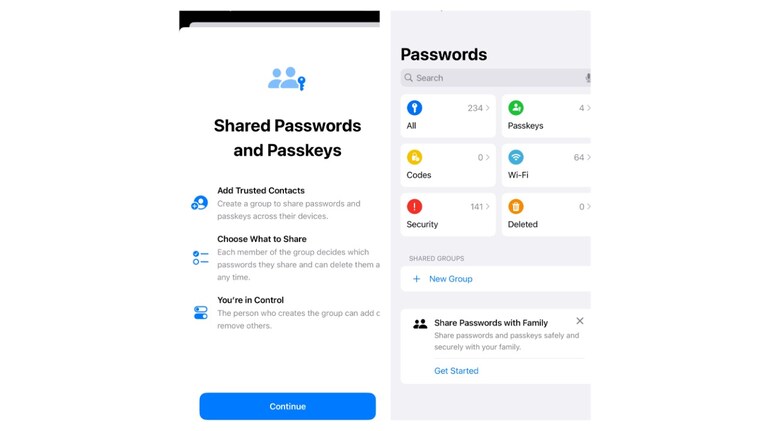
The deeper we get entrenched in the digital world, the more passwords we have to remember. And then there are the password requirements — some want an uppercase, some want 12 characters, special characters, and whatnot. Apple is set to make life easier for iPhone users with an all-new Passwords app. iOS 18 will roll out tomorrow (September 16) and the Passwords app will be a game changer for many. Here’s what the new Passwords app brings:
One-stop shop for all passwords
The Passwords app consolidates everything you need—passwords, passkeys, Wi-Fi credentials, verification codes, and even “Sign in with Apple” information—all under one roof. Whether you need to autofill your login details for websites and apps, save new passwords, or manually add passkeys, the Passwords app does it all.
Furthermore, there’s a shared passwords group feature which allows you to share some password credentials with others. What this does is that it makes it easier to share certain banking/Wi-Fi passwords with your family members.
Security is further enhanced by the ability to set up and manage two-factor verification codes directly in the Passwords app. The process is seamless, with codes autofilling into Safari without even having to open the app itself.
Additionally, the new sorting features let you arrange your accounts alphabetically or by recent activity, making it easier to find the specific account details you need quickly.
There’s also a security feature which tells you all the passwords that have been ‘compromised’. You will be surprised to see how many of your passwords are compromised.
If you are an inhabitant of the Apple ecosystem then iCloud Keychain automatically synchronises your passwords across all your Apple devices. To enable this feature, ensure it's turned on in your iCloud settings and that you're signed in to your Apple ID on each device.
Also, Apple has opened the Passwords app to Windows users as well. One can access their saved passwords on a Windows PC using the Passwords app within iTunes.


Discover the latest Business News, Sensex, and Nifty updates. Obtain Personal Finance insights, tax queries, and expert opinions on Moneycontrol or download the Moneycontrol App to stay updated!
Find the best of Al News in one place, specially curated for you every weekend.
Stay on top of the latest tech trends and biggest startup news.