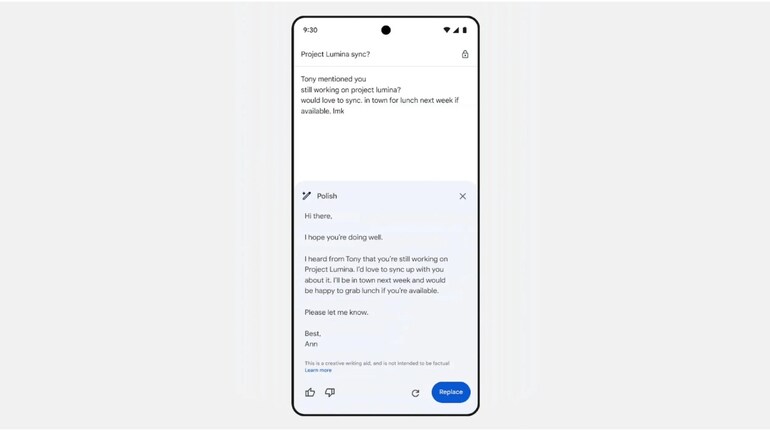
Google has rolled out two new updates in its ‘Help me write’ feature for Gmail. These updates include a new ‘Polish’ option and ‘Refine my draft’ shortcuts on Android, iOS, and web versions. These new Gemini features allow users to convert a rough email draft into a more polished or professional form and improve the user’s tonality of writing.
This new update was announced via a new Google Workspace blog post and it improves the ‘Help me write’ feature, which is there to help you write different types of emails. The new shortcuts for ‘Help me write’ and ‘Refine my draft’ will appear right next to the body of the email in an empty draft. Tapping on it will open the full Help me write experience.
Once you have written 12 or more words in a draft, this tool will allow you to Polish, Formalize, Elaborate, or Shorten any email draft. This feature not only helps users draft polished and error-free emails but also helps them save time in drafting an entire email from scratch.
Next, if you tap the ‘Polish’ option, Gemini will then take your draft and try to edit a rough note and or will effortlessly refine your emails. If you like what Gemini AI has done, a ‘Replace’ button will put the polished version in place of your old draft, which you can send to any user of your liking.
The new Gemini Polish feature is available for Google One AI Premium users. It is currently rolling out to Android, iOS, and web users, therefore, anyone who has a premium Google One account can take advantage of these new Gemini AI features.


Discover the latest Business News, Sensex, and Nifty updates. Obtain Personal Finance insights, tax queries, and expert opinions on Moneycontrol or download the Moneycontrol App to stay updated!
Find the best of Al News in one place, specially curated for you every weekend.
Stay on top of the latest tech trends and biggest startup news.