After the announcement at WWDC in June, Apple released the first public beta for iOS 17, which is due out later this year.
The next big update to Apple's smartphone operating system will bring with it some major changes and a lot of requested features. Here is how you can download the beta for yourself to try it out.
Also read | Best Features Of Apple iOS 17 | NameDrop, Check In, Clear OTP MessagesDownloading the iOS 17 public betaThe first thing you need is a compatible iPhone. The beta works with iPhone XS or higher, which means if you have bought an iPhone in the last four years, you should be good to go.
Also make sure that this device is not your daily driver, while the beta offers a ton of new features, it is still called beta for a reason. Now is the perfect time to pull out an old iPhone that you've had sitting in a cupboard.
You also need to sign up for Apple's Beta Software Program with your Apple ID. If you haven't, you can do so by visiting this page.
With those prerequisites out of the way, open up Settings on your phone, then head to General and then tap on Software Update. Look for Beta Updates and then select public beta. Make sure you are using the same Apple ID you used to sign up for the beta. The beta will now download and install on your device.
Also read | Apple drops iOS 17 support for iPhone 8 and iPhone XThe big features you need to tryNow that you have downloaded and installed the beta, where do you start? The best way is usually to keep using the phone for a while till you discover the features for yourself but we thought we'd make it easier by giving you some highlights.
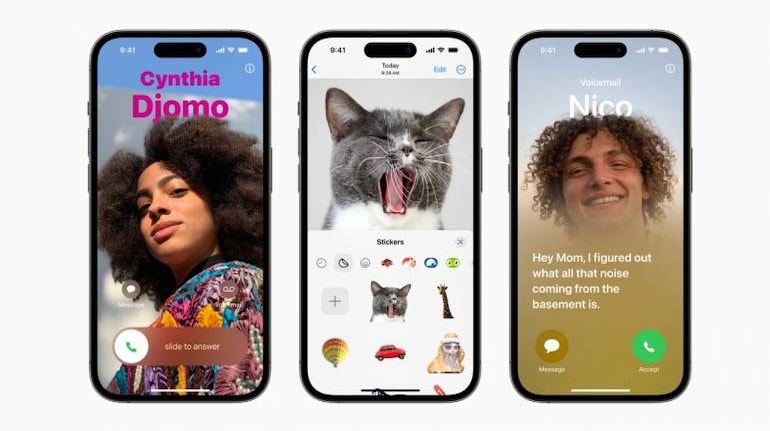
Apple has updated the Phone app with iOS 17 and it now allows you to use full-screen wallpapers for contacts. Called "Contact Poster" the feature also allows you to customize fonts making each contact unique and easy to distinguish.
The Messages app has been updated with custom stickers that allow you to create your own stickers for chats. Besides that, you can now share live location data using the "Check-In" feature. The data will include your battery readings, estimated time of arrival and more.
If you opt into it, the phone can also send critical information to your trusted contacts in case of emergencies.
You can respond to a missed call on FaceTime with a video or audio message. FaceTime can use the FaceID hardware on your phone to generate 3D effects and backgrounds that you can add to a video call.
You can turn your iPhone into a digital clock or photo album with "StandBy". The feature automatically activates when your phone is charging and placed horizontally, making it the perfect alarm clock.
Widgets have been improved and made more interactive with options for accessing features without actually opening the app. Interactive widgets will work with both first-party and third-party apps.


Discover the latest Business News, Sensex, and Nifty updates. Obtain Personal Finance insights, tax queries, and expert opinions on Moneycontrol or download the Moneycontrol App to stay updated!
Find the best of Al News in one place, specially curated for you every weekend.
Stay on top of the latest tech trends and biggest startup news.