

Every family has someone who is hesitant to use technology while making payments. An elder who still pauses before hitting “pay” or perhaps a teen who treats their allowance as if it’s infinite.
Unified Payments Interface (UPI) Circle aims to address the problem by bringing family members onto a single bank account, each with their own set boundaries.
What is UPI Circle?
UPI Circle is a feature in the UPI system that allows a primary user to authorise trusted individuals to make payments from their bank account with controlled access. The primary user remains the account holder and can decide whether the secondary user gets full or limited permission to carry out transactions.
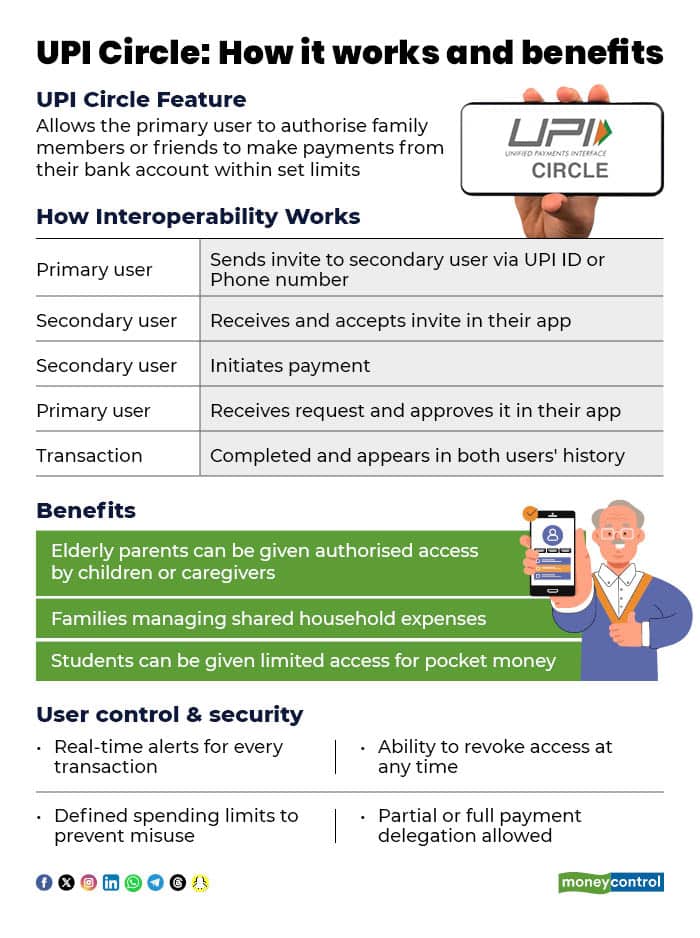
UPI Circle enables a person to link family members or trusted individuals to their UPI account, so that they can make payments when needed. The primary user can set limits or require approval for transactions, ensuring that spending remains monitored while still offering convenience.
UPI Circle represents a significant evolution in India’s digital payments ecosystem by enabling trusted delegation of financial transactions without compromising security. “By allowing a primary user to authorise controlled access to family members or dependents, the feature promotes both financial inclusion and digital literacy,” said Pankaj Tripathi, Founder and CEO of Vernost.
How UPI Circle fits into everyday life?
For senior citizens: UPI Circle makes it easier and safer for them to handle small, everyday payments. At the same time, family members can set spending limits and keep track of transactions, ensuring both safety and support.
For children and students: Parents can use UPI Circle to give children or teenagers digital pocket money while maintaining control over how much is spent. With predefined limits, payments stay within boundaries, eliminating the need to transfer money repeatedly.
For small businesses: Small shop owners or operators can authorise trusted staff to make payments for routine expenses such as fuel, tolls, or local purchases. This helps maintain transparency while keeping a clear record of all transactions.
Setting up UPI Circle
As the primary account holder (Delegator):
Open your UPI app (PhonePe, GPay, Paytm, BHIM, etc.)
Go to profile / settings
Look for UPI Circle or delegate payments
Tap add trusted person
Enter the trusted person's UPI ID or mobile number
Set the permissions, choose between:
Full delegation – they can pay without your approval
Partial delegation – each payment needs your approval
Set a spending limit
Confirm with your UPI PIN
A primary user can:
Add up to five trusted secondary users.
Set a monthly spending cap of up to Rs 15,000.
Decide how long the access will remain active, from one month to five years.
Track every transaction in real time.
Change permissions or withdraw access whenever required.
UPI Circle introduces a structured way to delegate payment access while still keeping the primary user in control. “However, users should remain mindful of how they grant access, set clear transaction limits, and periodically review authorisations. Convenience and trust must grow together for features like UPI Circle to reach their full potential,” Siddharth Mehta, Co-founder, Kiwi.
Discover the latest Business News, Sensex, and Nifty updates. Obtain Personal Finance insights, tax queries, and expert opinions on Moneycontrol or download the Moneycontrol App to stay updated!
Find the best of Al News in one place, specially curated for you every weekend.
Stay on top of the latest tech trends and biggest startup news.