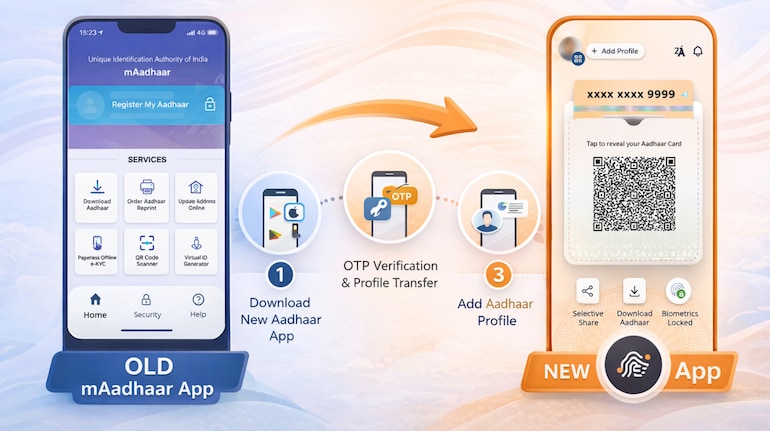

UIDAI has introduced the new Aadhaar app as a replacement for the older mAadhaar application, with a focus on simpler access and better control over personal data. While the switch does not require any physical verification, users should note that the transition is not automatic. Aadhaar profiles stored in mAadhaar must be added again in the new app.
How to download and set up the new Aadhaar app
To begin the switch, users must first install the new Aadhaar app on their smartphone.
Steps to download and set up the app:
1. Open the Google Play Store on Android or the Apple App Store on iOS.
2. Search for the official Aadhaar app published by UIDAI.
3. Download and install the app on your device.
4. Open the app and enter the mobile number linked to your Aadhaar.
5. Verify your identity using the OTP sent to your registered number.
6. Set up a security PIN or enable biometric authentication, depending on your device.
This initial setup ensures secure access to Aadhaar services on your phone.
Steps to switch from mAadhaar to the new Aadhaar app
The new Aadhaar app does not import profiles from mAadhaar automatically. Each Aadhaar profile must be added again.
Steps to add your Aadhaar profile:
1. Open the new Aadhaar app.
2. Select the option to add Aadhaar.
3. Enter your Aadhaar number.
4. Complete OTP-based authentication.
5. Confirm and save the profile in the app.
For users who had family members’ Aadhaar details saved in mAadhaar, the same steps must be repeated for each individual. The new Aadhaar app allows up to five profiles on one device.
Data transfer: What moves and what does not
No data is directly transferred from mAadhaar to the new Aadhaar app. This includes stored QR codes, downloaded Aadhaar PDFs, and cached information.
What happens instead:
1. The app fetches fresh Aadhaar data from UIDAI servers after authentication.
2. All information is encrypted and stored securely within the app.
3. Users must reset preferences such as language and display options manually.
This approach helps reduce risks linked to outdated or previously stored data.
What to do with the mAadhaar app after switching
Once all required profiles are successfully added to the new Aadhaar app, the older app is no longer needed.
Steps before uninstalling mAadhaar:
1. Confirm that your Aadhaar profile opens correctly in the new app.
2. Check that family members’ profiles, if any, are also added.
3. Test features such as offline verification or selective data sharing.
After verification, mAadhaar can be safely uninstalled.
Key things to keep in mind
Switching apps does not change your Aadhaar number, linked services, or authentication records. The transition only affects how Aadhaar services are accessed on your smartphone, with the new app becoming the primary platform going forward.


Discover the latest Business News, Sensex, and Nifty updates. Obtain Personal Finance insights, tax queries, and expert opinions on Moneycontrol or download the Moneycontrol App to stay updated!
Find the best of Al News in one place, specially curated for you every weekend.
Stay on top of the latest tech trends and biggest startup news.