







Microsoft Edge, formerly known as Explorer, once dominated the world of browsers, i.e. until Chrome came knocking. Microsoft is now attempting to revive the Edge browser with the introduction of the NewsGuard extension on mobile platforms. The NewsGuard extension integrated into the Microsoft Edge app is a built-in fake news detector. Microsoft partnered with NewsGuard to attempt to end the scourge of fake news.
NewsGuard doesn’t rely on machine learning algorithms or third-party websites to detect false news, misinformation, and disinformation. NewsGuard uses professional journalists to spot fake news. They assess websites and their credibility and transparency before providing a rating. The extension allows you to check the rating of a website before browsing through the content.
How to use NewsGuard on Mobile?You can also use the extension on the Chrome, Safari, and Firefox browsers by installing the plugin.
NewsGuard RatingsThe Edge app extension on the mobile app displays the rating of a website based on nine criteria. Each of the nine criteria is assigned a certain number of points, adding up to a total of 100. A website must achieve 60 points out of a 100 to be recognised as a reliable website by NewsGuard.
| Criteria | Weightage (Points) |
| Does not repeatedly publish false content | 22 |
| Gathers and presents information responsibly | 18 |
| Regularly corrects or clarifies errors | 12.5 |
| Avoids deceptive headlines | 10 |
| Website discloses ownership and financing: | 7.5 |
| Handles the difference between news and opinion responsibly | 12.5 |
| Reveals who’s in charge, including any possible conflicts of interest | 5 |
| Clearly labels advertising | 5 |
| Website provides the names of content creators, along with either contact information or biographical information | 5 |
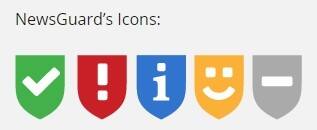
Unlike the app version, the NewsGuard browser extension displays icons that reflect a website’s rating based on NewsGuard’s appraisal criteria. You can simply hover over the NewsGuard icon with the mouse pointer to get a brief report as to why the website received the rating.
Green: Passes NewsGuard’s rating criteria
Red: Doesn’t pass the NewsGuard’s standards
Blue: Website features user-generated content
Orange: Denotes satire, and thereby content is not to be taken seriously
Grey: Still undergoing the review process.
You can even submit new websites for review if you want to verify the authenticity of their content by clicking the NewsGuard icon and then clicking Submit. By using professional journalists to review sites, NewsGuard offers a full-proof solution to tackle the menace of fake news.


Discover the latest Business News, Sensex, and Nifty updates. Obtain Personal Finance insights, tax queries, and expert opinions on Moneycontrol or download the Moneycontrol App to stay updated!
Find the best of Al News in one place, specially curated for you every weekend.
Stay on top of the latest tech trends and biggest startup news.








