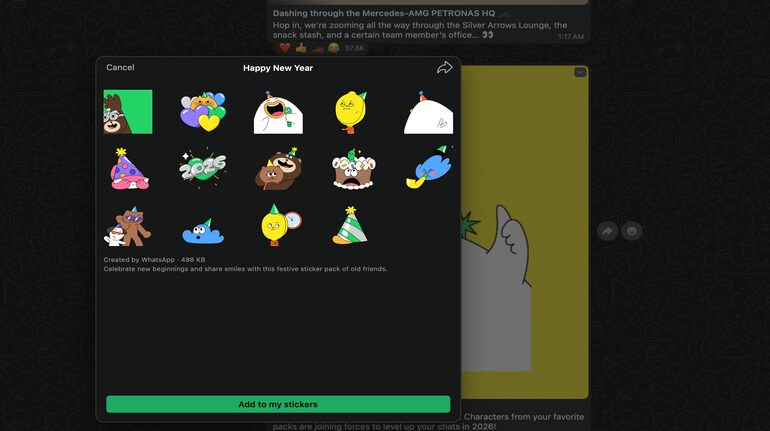

WhatsApp has rolled out a new Happy New Year 2026 sticker pack, giving users a fresh way to celebrate the occasion directly inside chats. The festive pack brings together familiar WhatsApp characters wearing party hats, holding balloons, popping confetti, and sharing cheerful “2026” visuals. The stickers are designed to work seamlessly across mobile and desktop platforms, making them easy to use whether you’re chatting on a phone, tablet, or PC.
What’s included in the Happy New Year 2026 sticker pack
The Happy New Year 2026 sticker pack includes a collection of animated and static stickers featuring popular WhatsApp characters in celebratory moods. From countdown-style “2026” graphics to playful party-themed illustrations, the pack focuses on light, expressive visuals that fit casual chats, group conversations, and broadcast wishes. The stickers are small in size and download quickly, even on slower connections.
How to download Happy New Year 2026 stickers on iPhone and Android
Downloading the sticker pack on smartphones is straightforward and does not require any third-party apps.
1. Open WhatsApp on your iPhone or Android smartphone.
2. Tap on any chat window.
3. Select the sticker icon near the message bar.
4. Look for the Happy New Year 2026 sticker pack banner or search for it in the sticker store.
5. Tap Add to my stickers to download the pack.
Once added, the stickers appear instantly in your sticker tray and are ready to use.
How to send New Year stickers in chats
After downloading the pack, sending stickers is quick and consistent across devices.
1. Open a chat or group conversation.
2. Tap the sticker icon.
3. Select the Happy New Year 2026 pack from your sticker library.
4. Tap on any sticker to send it instantly.
Using Happy New Year stickers on tablets and PCs
On WhatsApp Web and the desktop app, the sticker pack syncs automatically once it’s added on your phone.
• Open WhatsApp Web or the desktop app on your PC or tablet.
• Go to a chat and click the sticker icon.
• Select the Happy New Year 2026 sticker pack and send stickers as usual.
No separate download is required on desktops if the pack is already added on mobile. However, if you are doing it on your tablet or PC, then you may need to download it manually on these devices by following the process mentioned earlier.


Discover the latest Business News, Sensex, and Nifty updates. Obtain Personal Finance insights, tax queries, and expert opinions on Moneycontrol or download the Moneycontrol App to stay updated!
Find the best of Al News in one place, specially curated for you every weekend.
Stay on top of the latest tech trends and biggest startup news.