Eligible Apple devices in India can now upgrade to iOS 14. The latest operating system update is available for compatible iPhones such as the newer iPhone 11 and iPhone SE (2020), and the older iPhone 6S.
The company has also rolled out iPadOS 14, watchOS 7 and tvOS 14 for all users who have compatible devices. The iPadOS 14, watchOS 7, tvOS 14 and iOS 14 update was also made available for users on late September 16. The new operating systems for various Apple devices were unveiled earlier at the WWDC 2020 and have been available in beta.
If your device is eligible, you can simply open ‘Settings’, select ‘General’ and tap on ‘Software Update’. It would be a good idea to have your device plugged in for charging and connected to a strong Wi-Fi. This would ensure that the battery is not completely drained and the process is completed faster without finishing your data plan.
The new iPhone software comes with an all-new home screen and a ton of new features that claim to offer an enhanced user experience. Out of these many features, we list the best iOS 14 features that enter our favourites list.
Here are the top iOS 14 features:
Privacy: Apple has always been on the forefront when it comes to privacy and the lead gets better with iOS 14. One of the key iOS 14 privacy features is letting users know what data developers collect and how will it be used. You can also choose to share only selected items with a developer who asks for access to your photos, or you can give access to your entire library. Also, when an app is using the iPhone’s mic or camera, iOS 14 will display an indicator in the app and in the Control Centre.
App Library: One of the most welcomed features of iOS 14 has to be the App Library that gives a refreshing new look to the iOS home screen. App Library gives a list view of all the apps installed on an iPhone. The apps are categorised as suggestions, recently used, social, entertainment, etc.
Widgets: There's also Widgets, which come in different sizes and can be placed anywhere on the Home screen. Widgets can also be stacked (up to 10) by dragging one widget on top of another and swipe through them. The smarter implementation of widgets in iOS 14 is where you can select the Smart Stack in the Widget gallery. It uses on-device intelligence to surface the right widget at the right time based on factors like time, location, and activity.
Compact UI: iPhone users have often complained about the incoming call UI that takes up the entire screen when they receive a call. With iOS 14, these complaints are laid to rest. After updating the iPhone with iOS 14, the incoming call will be shown in a banner instead of taking over the entire screen. Users can swipe up on the banner to dismiss it or swipe down to access extended phone features and tap to answer. Third-party apps can take advantage of the developer API to add support for this feature.
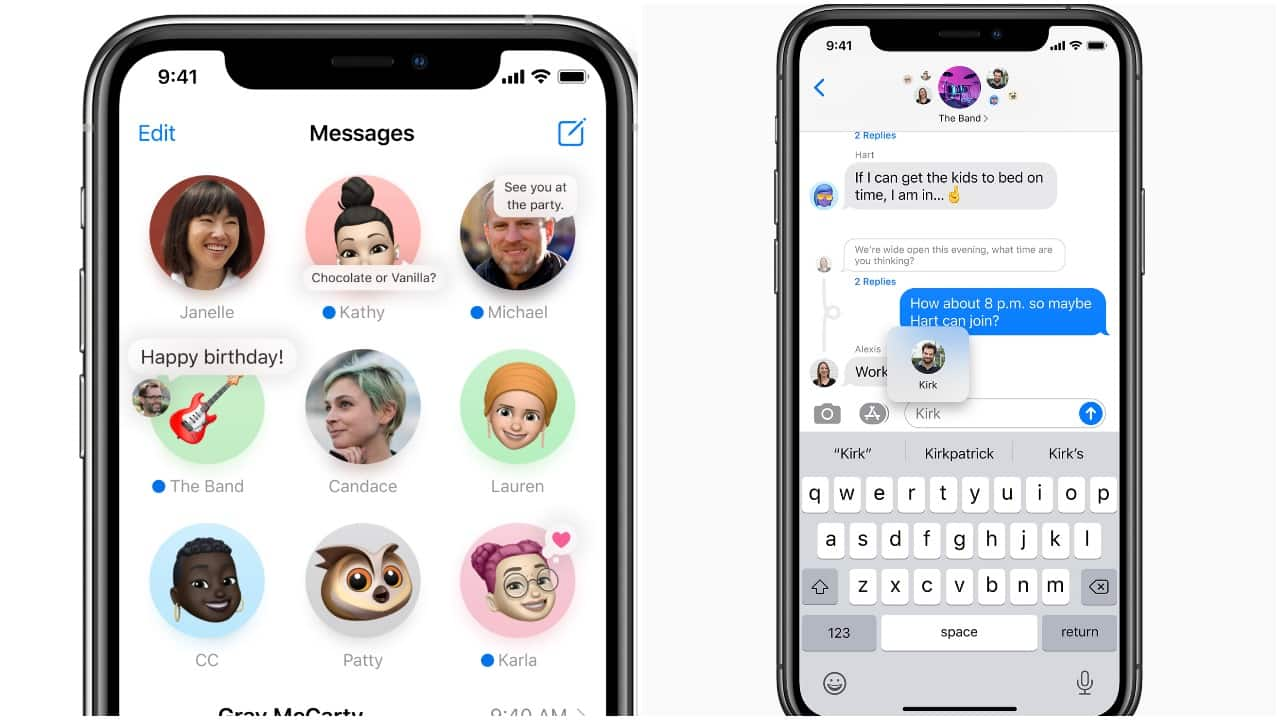 Messages app on iOS 14
Messages: The native Messages app gets four new features — Pinned conversations, Inline Replies, Mentions, and Group Photo. With Pinned Conversations, users can pin up to nine chats on the top of the conversation list in the Messages app. Inline Messages let you select and reply to an individual message in a group chat. You can view replies in the full conversation or as their own thread for a more focused view. ‘Mentions’ is basically a feature borrowed from the likes of WhatsApp and Slack. When you @ mention someone, the person’s name is highlighted. Users can also customise an active group so you only receive notifications when they are mentioned.
Automatic switching for AirPods: Automatic Switching makes the use of Apple’s ecosystem of connected products. Once the feature is rolled out in iOS 14, AirPods (and AirPods Pro) will automatically connect to the Apple device you are using. For example, if you are watching a video on your iPad and then answer your call on your iPhone, AirPods will automatically connect to the iPhone. Once you hang up the call and go back to using the iPad, the AirPods will detect and reconnect to your iPad. The same applies to Mac, iPod and Apple Watch.
Headphone accommodations: According to Apple, iOS 14 allows users to adjust their AirPods audio to account for hearing differences. ‘Headphone Accommodations’ is said to amplify soft sounds and can be tuned for individual hearing.
Translation: The Safari browser can now translate websites in seven different languages, Apple claims. A new icon will appear when you view a website that Safari can translate.


Discover the latest Business News, Sensex, and Nifty updates. Obtain Personal Finance insights, tax queries, and expert opinions on Moneycontrol or download the Moneycontrol App to stay updated!
Find the best of Al News in one place, specially curated for you every weekend.
Stay on top of the latest tech trends and biggest startup news.