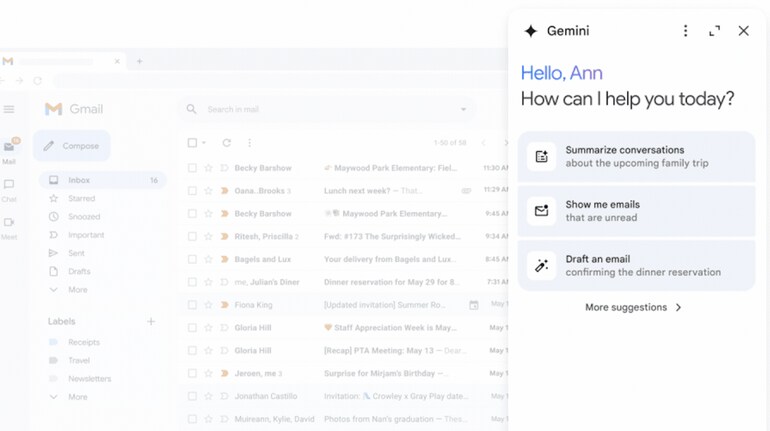
Google has announced that it is rolling out Gemini AI for Gmail on web, Android and iOS. The Gemini AI chatbot will now be added to the Gmail side panel in web version of Gmail and also integrated into the Gmail app on Android and iOS. Additionally, Google is also bringing Gemini AI to the side panels of Google Docs, Google Sheets, Google Slides, and Google Drive.
As per Google, select Google Workspace customers can now use Gemini in Gmail on web to summarise an email thread, suggest responses to an email thread, get help drafting an email and ask questions and find specific information from emails within their inbox or from their Google Drive files.
Put freeform queries to Gemini to search your Gmail inbox
Google says that users can also put freeform questions to Gemini in Gmail and won’t have to leave Gmail to get answers from Gemini.
As an example, Google said that Gmail users can search their inboxes with queries like "What was the PO number for my agency?", "How much did the company spend on the last marketing event?", or "When is the next team meeting?".
Like with Gmail web users, those using the Gmail mobile app on Android and iOS can now “analyze email threads and see a summarized view with the key highlights” with the help of the Gemini sidebar.
Gemini sidebar in Gmail: Availability
The Gemini sidebar in Gmail will be available to Google Workspace customers with Gemini Business and Enterprise add-on, Gemini Education and Education Premium add-on, or Google One AI Premium.
Google plans to add mobile features like Contextual Smart Reply and Gmail Q&A soon.


Discover the latest Business News, Sensex, and Nifty updates. Obtain Personal Finance insights, tax queries, and expert opinions on Moneycontrol or download the Moneycontrol App to stay updated!
Find the best of Al News in one place, specially curated for you every weekend.
Stay on top of the latest tech trends and biggest startup news.