Apple's iOS 17 promises a lot of new features and many of them have been requested for quite a while. First previewed in June, here's a look at what Apple's next major update to its iPhone operating system has in store.
Overhauled Phone app
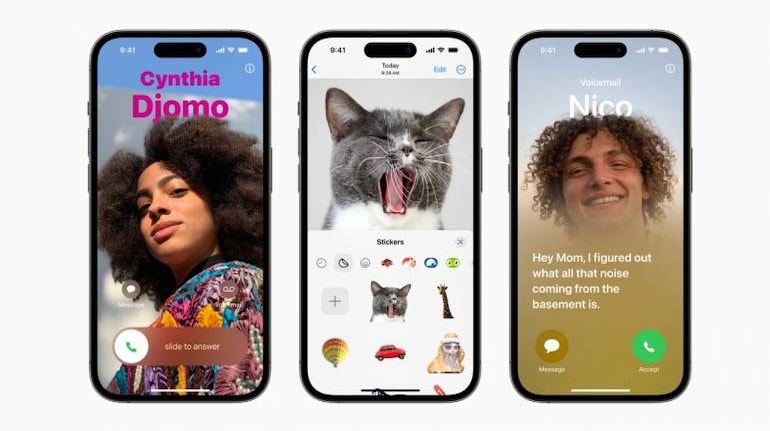
Apple went back to basics and has completely overhauled the Phone app. The first new feature to talk about is contact, which allow you to set individual, full-screen photos for each of your contacts.
You can also share contact posters with other users as well. It supports full-screen backgrounds or memojis. You can customise fonts for each of your contacts.
Voicemail has also seen changes. Now when someone leaves a voicemail, you will see a full-text transcription of the message on your Lock screen. Unknown callers will now directly go to voicemail, while calls identified as Spam from carrier networks will automatically be declined.
Apple is improving dual-SIM support with iOS 17, and adding an option to sort through SMS based on SIM. You can also set separate ringtones for each SIM.
Also read | iPhone 15: All the rumours so far
Improvements to Messages
Apple has cleaned up the interface for messages and you can now access apps and tools within the interface by pressing the "+" button.
Then there is Check-In, a new safety feature that allows users to let their trusted contacts know they are safe. Your chosen contacts will automatically be notified when you reach a chosen destination.
If messages find that there is no progress being made on your route, it will check in with you and if it gets no response, it will immediately send your location to trusted contacts, along with other information such as battery level, network strength etc.
Stickers has been revamped and now allows you to see stickers you have downloaded, or created from photos and memojis all in one spot. Speaking of which, emojis can now be used as stickers.
New features for FaceTime
If you happen to miss a FaceTime call, you can now leave audio or video messages to the participants. Reactions add 3D augmented reality effects to your video, that can be triggered by hand gestures. These are only available when you use the front-facing camera.
New Journal App
Apple plans to roll out a new journal app sometime later in the year. It will let users jot down quick thoughts and track activities. It will even suggest topics to write about based on your data.
Journal entries can be embedded with music, photos or audio recordings with important moments highlighted. The Journal will be passcode and FaceID protected. All suggestions are calculated on-device, and all Journal entries will be end-to-end encrypted so no one else can read them.
Improvements to Safari
Apple's Safari browser can now support profiles, which means you can have separate settings according to use, for example - a profile for office and home.
Each profile will have its own history page, extensions, cookies, and saved bookmarks. Your tab groups will also be saved.
Your passwords can now be shared securely among family and friends using the iCloud Keychain. Each participant in the group can edit or add a set of passwords accessible to the whole group.
Safari will automatically remove tracking URLs. This also extends to messages and mail.
Offline Maps
Apple Maps can be downloaded and viewed offline. You can even select specific areas to save. This will allow turn-by-turn directions without burning up your monthly data limit.
Improvements to subject detection in Photos
The Photos app can now distinguish people better and there have been several improvements made to how it detects pets.
Visual Look Up
Visual Look Up now supports food. You can simply tap on the "Info" button for any photo of a dish and a visual look up will fetch you more information about the ingredients or show similar recipes.
Mood tracking for the Health app
The health app can now track moods. Just open up the app, and select what you are feeling like. You can also choose factors that may have affected your mood like work or family.
Your responses will be tracked and shown to you in an easy-to-digest summary to give you an overview of how you were feeling each day.
Auto-fill verification codes on Mail
The mail app can now auto-fill verification codes. This is useful when you have to authenticate your account on a service and it sends you an email. Auto-fill will input the code for you, the moment it receives the mail.
Also read: iPhone 15 vs Pixel 8: Which phone is right for you?
Updates to Reminders
The reminders app can now sort your groceries into categories to make shopping easier. Your items will be sorted into different headers like produce, milk or bread and will be added to the shopping list.
Camera
The camera app can now show you a horizontal line in the viewfinder to better align your subject. These are helpful for landscape shots when you want to know your frame is levelled.
Find My
AirTags can now be shared with up to five family members. Each person in the group can use precision finding to spot their items.
These are just some of the major features planned with the release of iOS 17. You may also want to have a look at some India-specific features you might be interested in.


Discover the latest Business News, Sensex, and Nifty updates. Obtain Personal Finance insights, tax queries, and expert opinions on Moneycontrol or download the Moneycontrol App to stay updated!
Find the best of Al News in one place, specially curated for you every weekend.
Stay on top of the latest tech trends and biggest startup news.