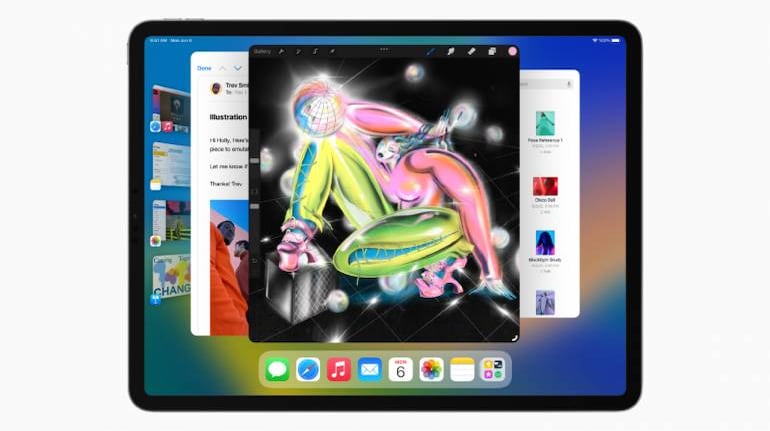
Apple's iPadOS 16 brings a lot of updates that have been designed to take advantage of the powerful M1 chip within the device. There is also a new multitasking experience, updates to Safari, Mail and Messages, and new professional oriented features. Here is a look at all the major updates announced for iPadOS 16.
Stage Manager: A new multitasking experienceTaking advantage of the iPad's powerful M1 chip, Apple has introduced a new multitasking experience, that leverages that power and gives users a simpler way of keeping things organized.
Stage Manager automatically organizes all open apps and windows, giving users a bird's eye view of everything open on their device, while still maintaining the app you are currently working with in sharp focus.
It organizes open apps, web pages and documents in one collated view, while still maintaining focus on the app you are currently working with. Stage Manager also allows you to bundle apps together, and save them as a group, to be recalled later.
When the view is open, all your open apps and files are moved over to the left side, arranged in a 3D view that lets you look at them at a glance. All open windows in an app, for example - open tabs in Safari, will also be organized and laid over the thumbnail for the app on the left side of the screen.
The center of the display is still dedicated to the app you are currently using, and you can switch between apps by simply tapping on one from the left side. You can also drag, and rearrange the size of the open windows, or resize open apps, all within the multitasking view. Stage Manager also has full external display support, for resolutions up to 6K.
Unfortunately, Stage Manager is only supported on iPads that have the M1 chip inside them, which means only the iPad Pro and iPad Air, support the feature for now.
Apple has also introduced some features aimed at pro users. The first of which is a new Reference Mode, that takes advantage of the Liquid Retina XDR display on the iPad, to match color requirements for a project. This enables a user to utilize workflows where accurate colors are crucial.
For M1-powered iPads, Display Zoom increases the pixel density of the display to allow users to view more content in their apps.
Virtual Memory Swap allows the internal storage of the iPad as memory for apps, and can deliver up to 16GB of extra memory, when needed.
Weather app debuts on the iPadApple's Weather app has been reworked for the iPad, with new animations to take advantage of the tablet's display. It allows users to see all weather information in one place, with a full screen experience that tells temperature, air quality, precipitation and more, with a detailed layout that shows everything at a glance, with graphs and stats.
Freeform: A new collaborative tool for the iPadFreeform allows users to collaborate together in one place, using a flexible canvas with full support for Apple Pencil, and without having to worry about layouts and page sizes. The real-time tool allows users to draw or list out their ideas, and when they make changes, it is reflected to every other participant you are collaborating with.
Freeform also supports FaceTime, allowing you to start a project right from a call, and also allows you to see all important updates in the Messages thread.
Besides these major features, iPadOS also features all iOS 16 updates made to Mail, Messages, Safari and Live Text/Visual Look Up, along with support for iCloud's shared photo library.


Discover the latest Business News, Sensex, and Nifty updates. Obtain Personal Finance insights, tax queries, and expert opinions on Moneycontrol or download the Moneycontrol App to stay updated!
Find the best of Al News in one place, specially curated for you every weekend.
Stay on top of the latest tech trends and biggest startup news.