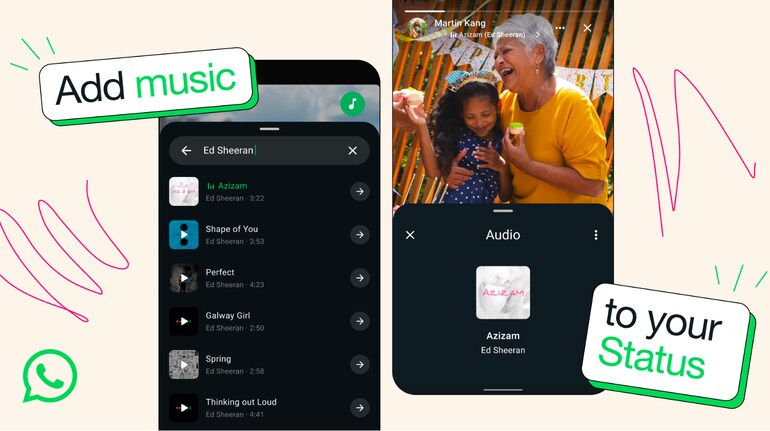
WhatsApp users can now add music to their photos in Status updates. Meta CEO Mark Zuckerberg announced the feature via WhatsApp’s official channel, stating that users can choose music from a built-in library. This update is rolling out globally and is expected to enhance the way users share moments on the platform.
What is the new WhatsApp Status music feature?WhatsApp’s new feature allows users to add background music to photos in their Status updates. This works similarly to Instagram Stories, where users can pick a song from a music library and overlay it on an image. The feature is designed to make Status updates more engaging by letting users express their mood with a song.
How to add music to WhatsApp StatusTo add music to a WhatsApp Status:
Open WhatsApp and go to the ‘Updates’ tab.
Tap on the camera icon at the top left that reads ‘Add Status’ to add a new Status.
Select a photo from the gallery or take a new one.
Tap the new music icon at the top to open the music library.
Choose a song and select the part of the track you want to feature.
Adjust the placement of the music sticker if needed.
Post the Status update with the selected song.
Things to knowThe music will play automatically when someone views the Status. This feature is expected to be available on both Android and iOS versions of WhatsApp.
The music library consists of licensed tracks, similar to Instagram’s music feature.
Users cannot upload their own songs yet.
Up to 15 seconds for a photo and up to 60 seconds for a video.
The feature is rolling out gradually, so some users might not have it immediately.


Discover the latest Business News, Sensex, and Nifty updates. Obtain Personal Finance insights, tax queries, and expert opinions on Moneycontrol or download the Moneycontrol App to stay updated!
Find the best of Al News in one place, specially curated for you every weekend.
Stay on top of the latest tech trends and biggest startup news.