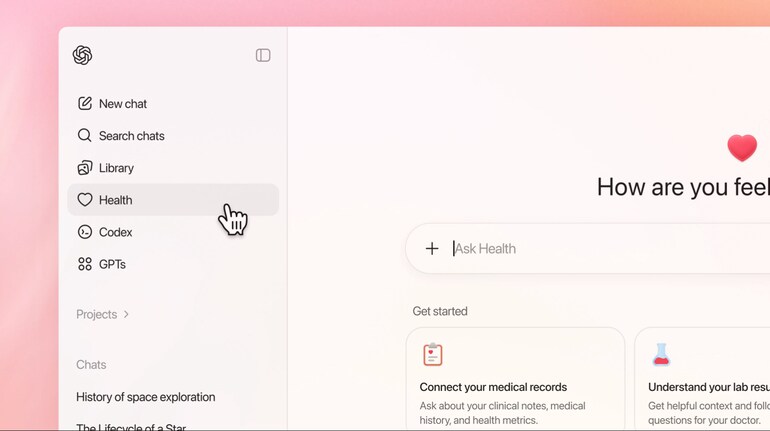

OpenAI has introduced ChatGPT Health as a dedicated space within ChatGPT that helps users make sense of medical records, lab results, and wellness data while keeping health information separate and protected. Here is a step-by-step guide on how to use the ChatGPT Health feature to better understand your health information.
What is ChatGPT Health
ChatGPT Health is a separate health-focused experience inside ChatGPT. It allows users to securely connect medical records and supported wellness apps so conversations are grounded in personal health data. The feature is designed to support understanding and preparation, not diagnosis or treatment, and is meant to complement discussions with healthcare professionals.
How to access ChatGPT Health
Open ChatGPT on the web or iOS.
Sign in using your existing account.
If you have access, select Health from the left sidebar menu.
If Health is not visible, join the waitlist and wait for access to be enabled on your account.
How to connect medical records and apps
Open the Health section from the sidebar.
Select the option to add information or connect apps.
Choose medical records or supported wellness apps such as Apple Health or nutrition and fitness platforms.
Review the data types being shared and provide explicit permission.
Complete the connection. You can disconnect any app at any time from Settings.
How to understand your medical records
Upload lab reports, visit summaries, or medical PDFs directly into Health.
Ask clear questions such as “Explain my latest blood test results” or “Summarize my last visit notes.”
Review the explanation provided in simple language.
Use follow-up questions to understand trends, ranges, or terms you find unclear.
How to use wellness data for daily insights
Connect supported fitness, nutrition, or activity apps.
Ask questions like “How has my sleep changed this month?” or “What does my activity data show?”
Use the responses to spot patterns over time rather than focusing on a single day.
Prepare notes or questions for discussions with your doctor or nutritionist.
Privacy and data controls
Health conversations are stored separately from regular chats. Data shared in Health is not used to train foundation models, and users can view or delete Health memories at any time. Additional protections such as encryption and optional multi-factor authentication help keep information secure.
Using ChatGPT Health responsibly
ChatGPT Health is intended to help users feel informed and prepared. It does not replace professional medical advice. Use it to understand information, organize questions, and track patterns, and always consult a qualified healthcare professional for diagnosis or treatment decisions.


Discover the latest Business News, Sensex, and Nifty updates. Obtain Personal Finance insights, tax queries, and expert opinions on Moneycontrol or download the Moneycontrol App to stay updated!





Find the best of Al News in one place, specially curated for you every weekend.
Stay on top of the latest tech trends and biggest startup news.