Google has introduced Lyria 3, an AI music generation model that creates full 30-second tracks from text, image, or video inputs. The system arranges instruments, generates lyrics, synthesizes vocals, and embeds SynthID watermarking to identify AI-created audio.
How to access Lyria 3
1. Open the Gemini chat interface.
2. Use the music generation feature available within the chat environment.
3. Ensure audio generation is supported in your region and account settings.
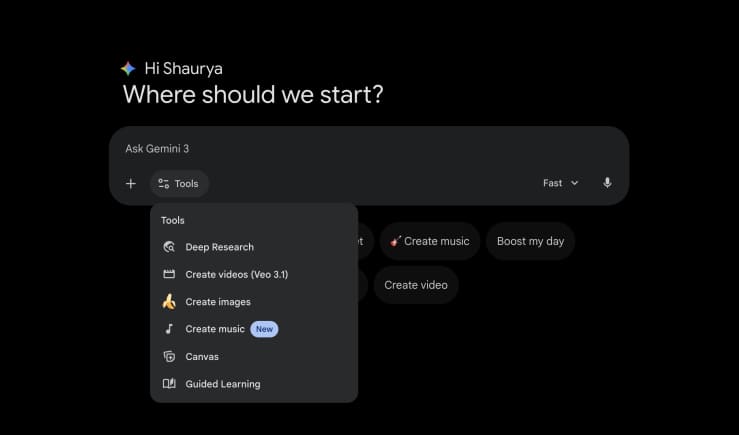 Google Gemini Music
Step-by-step guide to creating music
Step 1: Choose your input type
Select whether you want to generate music using text, an uploaded image, or a video file.
Step 2: Write your prompt
Specify genre, tempo, mood, instruments, language, and voice type. If using image or video inputs, include clear instructions describing how the system should interpret visual elements.
Step 3: Generate the track
Submit the prompt. Lyria 3 processes the request and produces a 30-second music track.
Step 4: Review the output
Listen to the generated composition, which includes arranged instruments and synthesized vocals if requested.
Step 5: Download the audio file
The track is available for playback within the interface and can be downloaded. SynthID watermarking is embedded within the audio frequencies for identification.
How Lyria 3 generates music
Text prompts are analyzed to determine rhythm structures, instrument selection, and song arrangement. Image-based inputs are translated into audio patterns using visual cues such as lighting, colors, and composition. Video-based inputs map movement and pacing to tempo changes.
The system layers drums, basslines, chord progressions, and melodies to construct the composition. Volume levels are balanced automatically, and effects like reverb and delay are applied to refine the mix.
For vocals, the model generates lyrics and aligns syllables to melody. It controls pitch, timing, and breathing sounds to match the instrumental arrangement.
Sample music prompts to try
Prompt 1
Generate a 30-second indie pop track at 115 BPM featuring a female vocalist singing in French. Structure the lyrics around daily conversational phrases. Layer acoustic guitar chords over a steady drumbeat to construct a rhythm suitable for language study.
Prompt 2
Compose a 30-second heavy metal instrumental at 160 BPM to pace a weightlifting routine. Combine distorted rhythm guitars with a double kick drum pattern. Increase the volume and tempo of the snare drum sequence during the final 10 seconds.
Prompt 3
Produce a 30-second cinematic background score tailored for the character Rehman Dakait from the movie Dhurandhar. Integrate traditional string instruments with sub-bass frequencies. Maintain a tempo of 85 BPM to establish a dramatic tone.
Prompt 4
Create a 30-second synthwave track at 120 BPM to function as audio for a Realme GT 8 Pro video review. Utilize arpeggiated synthesizers and a four-on-the-floor drum pattern. Include an audio sweep effect at the 15-second mark.
Prompt 5
Write a 30-second ambient electronic track at 70 BPM to represent the experience of sitting in a car with a factory-fitted air purifier. Blend soft pad synthesizers with recordings of white noise. Keep the equalization balanced to produce a muted sound profile.
Sample sound effects prompts to try
Cinematic Trailer Transition "A deep, cinematic sub-bass boom (Braam) that transitions into a sharp, metallic riser sound. The audio should end with a sudden silence to create a 'drop' effect suitable for a movie trailer suspense moment."
Sci-Fi User Interface "A sequence of futuristic computer interface sounds. High-pitched digital bleeps, rapid data-processing clicks, and a holographic 'swoosh' sound for opening a menu. The texture should be clean, synthetic, and high-tech."
Retro Arcade Game Pack "8-bit synthesizer sound effects reminiscent of 1980s video games. Include a bright 'coin collect' chime, a short square-wave 'jump' sound, and a low-frequency 'game over' descent. The audio should have a pixelated, low-fidelity quality."
Rainy Lo-Fi Ambiance "The sound of heavy rain hitting a window pane mixed with the distant, muffled sound of thunder. Overlay a subtle vinyl crackle texture to create a cozy, lo-fi atmospheric background loop."
Office Environment Foley "The mechanical clicking of a fast typist on a keyboard, accompanied by the ambient hum of an air conditioner and the distant, indistinct murmur of office conversation. The sound should be realistic and spatial."


Discover the latest Business News, Sensex, and Nifty updates. Obtain Personal Finance insights, tax queries, and expert opinions on Moneycontrol or download the Moneycontrol App to stay updated!
Find the best of Al News in one place, specially curated for you every weekend.
Stay on top of the latest tech trends and biggest startup news.