
Smartphones have become an integral part of our lives. We use them for everything from work to entertainment as well as storing our entire digital footprint, which makes losing a phone a cause for concern, to say the least. For some losing a phone could bring both their personal and professional life to a halt.
However, losing a phone to theft or just negligence, need not be the end of the world. So let us go through a few steps that can be taken to ensure you can effortlessly retrieve personal and professional data in the event of your phone being stolen or misplaced. But first, here are some things you should do as soon as you realise your phone isn’t there, in the hopes of retrieving it.
Call &/Or Text the Phone
Call your phone is obviously the first thing any person does once a phone has been misplaced. However, ensure you have family members’ names stored with some complementing common nouns – ‘mom’, ‘dad’, ‘wife’, or ‘sister/brother’. This is because if a good Samaritan comes across it, these names will be the first thing someone who’s looking to return your device will search for. You can also send a text message with a mobile number to contact to return the phone. The text message will display on the screen without unlocking the phone which will help a person contact you to return your device.
Activate Find My Device
There is an in-built feature on every Android smartphone called Find My Device or Find My Mobile on Samsung devices. This feature can be used to track, ring, lock, or erase your smartphone remotely, in the event that it is stolen. You will be able to find this feature in the Settings tab under Security and simply need to toggle it on.
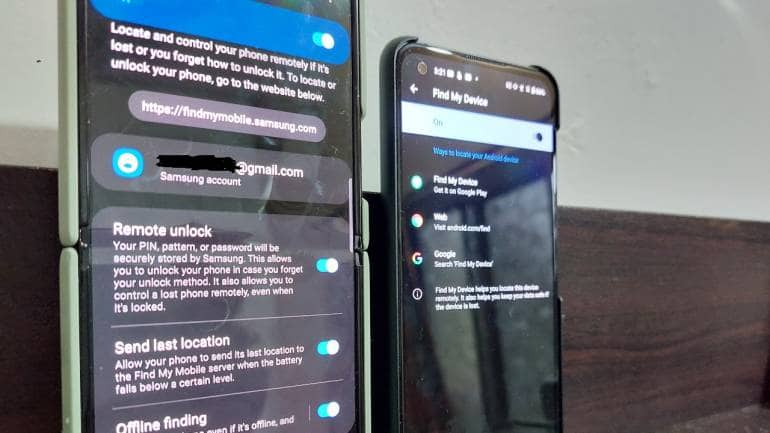
You also need to ensure that the Location is turned on. You can go to Google’s Find My Device page to play a ringtone on the device, even if it is on silent, secure the phone, or erase the device entirely. You may have to sign in with the same Gmail account registered on the phone to use this feature. You will also have the option to change your password or lock your device using this feature.
If all else fails, you can track your device through GPS using the Find My Device option. Provided your device has an internet connection, its location will be displayed on Google Maps. Apart from checking recent locations, you can log in to your Google account from another device and go to Google Location History to see the device’s current location.
For more information, head on over to the link.
Bluetooth Tracker, Smart Speaker
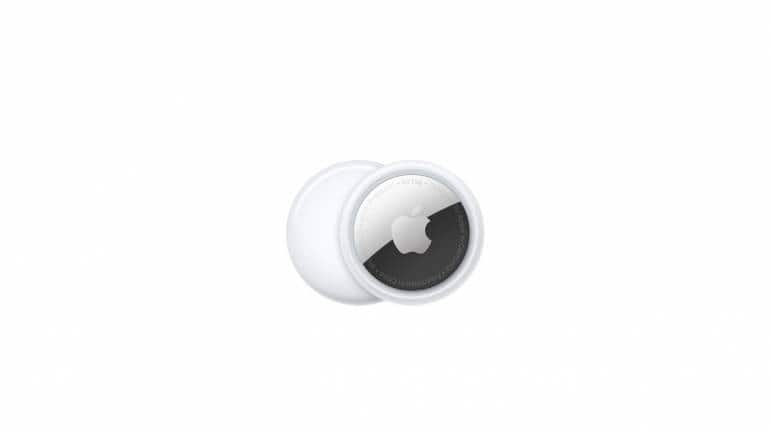
A Bluetooth tracker is another way of tracking your phone if it is misplaced, although this only works within a particular range. Once you purchase a Bluetooth tracker, simply sync your phone to it, and then you’ll be able to find it by pushing the button on the tracker as it will set off an alarm on the phone.
If you often misplace your smartphone around the house, you can also use a smart speaker to find it, i.e., if your device and speaker are signed in to the same account. On Google Home, all you need to do is say, “Okay Google, find my phone” and the device will ring even if it is on silent or vibrate.
Lock Screen Message
There are various types of lock screen messages you can set up if your phone is stolen. Without a password, no one is getting into your device. So, you can set up messages letting people know you are looking for the device. You can use the combination of location tracking and lock screen messages to send intimidating messages to anyone who has stolen the device by constantly reminding them that you know the whereabouts of the phone and are tracking their movements.
Safeguarding your Accounts
The chances of having multiple social media, email, and other important accounts logged into your phone are quite high, so signing out of them is a crucial step to protecting your data. But you should do it nonetheless. Whether it is something as important as your primary Gmail account or no more than an Amazon account, make sure to sign out of each account individually. You can opt to erase your entire device using Find My Device, although you won’t be able to track it once you do that.

If you’ve given up on getting your device back, then the first thing you should do after misplacing your phone is 'block your SIM'. This will ensure that no OTPs go to your number, preventing future purchases or entry into certain accounts. It is worth noting that deactivating your SIM will end your data connection, although Android and iOS phones can be tracked when connected to a Wi-Fi network without the use of a SIM card in them.
Report the Theft
In India, you can always file an FIR (First Information Report) to report the theft of a device. This can be done online or by heading to your nearest police station.
Once you lose your phone, there’s a strong chance that you may never get it back. So rather than wait for it to get lost, here are a few precautionary measures you should take right away.



Discover the latest Business News, Sensex, and Nifty updates. Obtain Personal Finance insights, tax queries, and expert opinions on Moneycontrol or download the Moneycontrol App to stay updated!
Find the best of Al News in one place, specially curated for you every weekend.
Stay on top of the latest tech trends and biggest startup news.