Moneycontrol PRO
Black Friday Sale
Black Friday Sale
HomeEducationCBSE Result 2024: DigiLocker access codes released for CBSE 10th, 12th Results; check details here

CBSE Result 2024: DigiLocker access codes released for CBSE 10th, 12th Results; check details here

The Central Board of Secondary Education (CBSE) has issued 6-digit DigiLocker Access Codes, for students of Class 10 and 12 to access their upcoming CBSE Board Results 2024. Read below to get more details about the same.

May 06, 2024 / 17:22 IST
CBSE Result 2024: DigiLocker access codes released

The Central Board of Secondary Education (CBSE) is gearing up to release the results for Class 10 and Class 12 examinations of 2024. In preparation, CBSE has provided DigiLocker access codes to schools to distribute to students for secure access to their academic documents.

The CBSE Board has enabled schools to download the 6-digit DigiLocker access codes from their own DigiLocker accounts. These codes are essential for students to access their results and other official documents on the DigiLocker platform once the results are declared.

CBSE Board 10th, 12th Results Date and Time 2024

The CBSE is set to announce the results for Class 10 and 12 post-May 20, 2024. Students will be able to access their results through multiple channels such as the official CBSE website cbse.nic.in, DigiLocker, SMS, and the Umang App. To view their scorecards, students will need their admit card number, roll number, and school number.

How to Access CBSE Board Results DigiLocker Codes 2024?

Schools can follow these steps to retrieve and distribute DigiLocker Access Codes:

  • Visit the CBSE DigiLocker Portal: Go to cbse.digitallocker.gov.in.
  • School Login: Enter the required credentials and select 'Login as School'.
  • Download Codes: Choose 'Download Access Code file' from the options.
  • For Class 10: Click on ‘Download Access Code for Class X’.
  • For Class 12: Click on ‘Download Access Code for Class XII’.
  • Distribution: Once downloaded, schools should individually share the Access Codes with students, maintaining confidentiality.
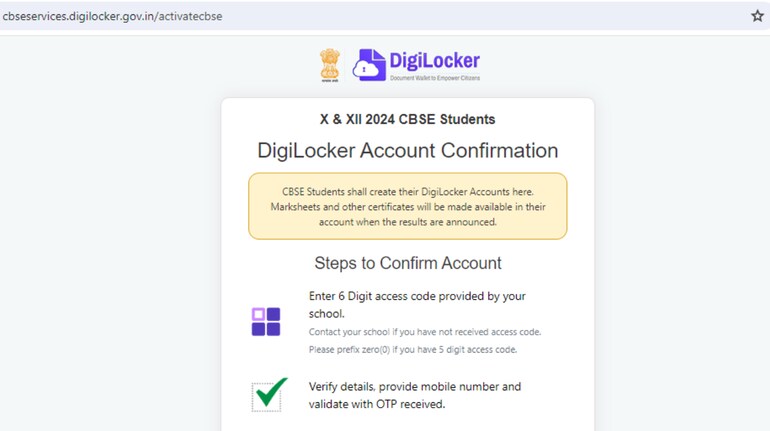
Step-by-step Guide for Students to Create DigiLocker Account

To access their CBSE Board results, marksheet and important documents, students can create a DigiLocker account by following these simple steps:

  • Obtain a 6-digit access code from your school, which is essential for activating your DigiLocker account. If you haven't received it, contact your school's administrative office to obtain one.
  • Go to the official DigiLocker website at https://digilocker.gov.in or download the DigiLocker app from the Google Play Store or Apple App Store.
  • Enter the 6-digit access code provided by your school. If your access code consists of only 5 digits, add a zero (0) at the beginning to make it a 6-digit number.
  • Ensure that the details you provide on the DigiLocker platform match those in your school records to facilitate a smooth verification process.
  • Enter your mobile number on the platform. You will receive a One-Time Password (OTP) on this number; enter this OTP to verify your phone and authenticate your account setup.
  • Once your mobile number is verified, your DigiLocker account will be activated, allowing you secure and permanent access to your educational documents.
  • After the declaration of results, log into your DigiLocker account and navigate to the education documents section to view and download your marksheets.
Moneycontrol News

Discover the latest Business News, Sensex, and Nifty updates. Obtain Personal Finance insights, tax queries, and expert opinions on Moneycontrol or download the Moneycontrol App to stay updated!

Subscribe to Tech Newsletters

  • On Saturdays

    Find the best of Al News in one place, specially curated for you every weekend.

  • Daily-Weekdays

    Stay on top of the latest tech trends and biggest startup news.

Advisory Alert: It has come to our attention that certain individuals are representing themselves as affiliates of Moneycontrol and soliciting funds on the false promise of assured returns on their investments. We wish to reiterate that Moneycontrol does not solicit funds from investors and neither does it promise any assured returns. In case you are approached by anyone making such claims, please write to us at grievanceofficer@nw18.com or call on 02268882347