Moneycontrol PRO
HomeTechnologyBought an iPhone 17? Here are 4 easy ways to move everything to your new device: A step-by-step guide

Bought an iPhone 17? Here are 4 easy ways to move everything to your new device: A step-by-step guide

Below are four clear, step-by-step methods to transfer your data (apps, photos, settings and more) from your old phone to a new iPhone. Pick the one that fits your backup habits and connection speed.

September 21, 2025 / 21:54 IST
Apple iPhone

Getting a new iPhone is fun — the setup isn’t. Below are four clear, step-by-step methods to transfer your data (apps, photos, settings and more) from your old phone to a new iPhone. Pick the one that fits your backup habits and connection speed.

Easiest: Restore from iCloud (recommended if you already back up)
  • On the old iPhone: Settings > Your name > iCloud > iCloud Backup → Back Up Now (wait until it finishes).
  • Turn on the new iPhone and follow the setup assistant until you reach Apps & Data.
  • Tap Restore from iCloud Backup, sign in with your Apple Account, and choose the latest backup.
  • Wait — settings restore first; apps download in the background. Sign back into accounts when prompted.

Tip: Make a fresh backup if the old phone’s backup is older than a day.

Fastest: Direct iPhone → iPhone transfer (wireless or wired)
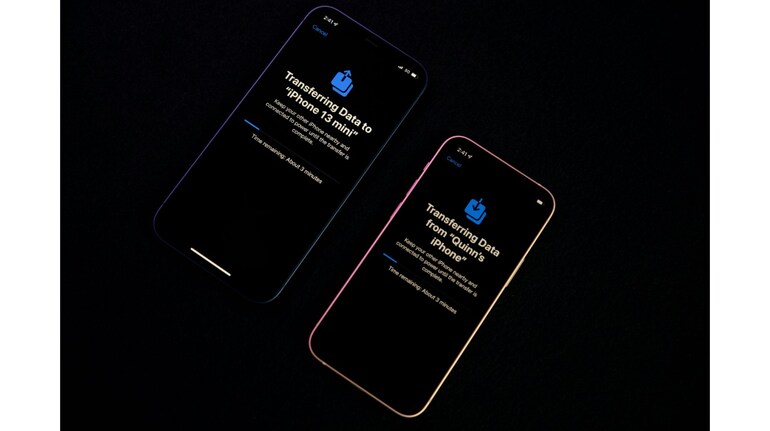
  • Turn on both iPhones, place them near each other. On the new iPhone, follow Quick Start prompts.
  • Choose Transfer Directly from iPhone. For wired transfers, connect phones with a fast data cable (and adapter if needed).
  • Keep both devices plugged in and on Wi-Fi (if wireless). Follow on-screen time estimates.
  • When finished, apps and media continue downloading; sign into accounts as needed.

Tip: Wired transfers are often quicker than wireless — use a cable rated for data, not just charging.

Most complete: Restore from an encrypted Mac or PC backup
  • On Mac (Finder) or PC (iTunes/Apple Devices), connect your old iPhone and Encrypt backup (check the box) — set a memorable password.
  • Create the backup (Archive it if on Mac so it won’t be overwritten).
  • Connect the new iPhone, choose Restore Backup, pick the encrypted file and enter the password.
  • Wait — the new iPhone will be an almost exact clone (no re-logins required for many apps).

Tip: Encrypted backups save passwords, Health data and Wi-Fi settings.

From Android: Move to iOS
  • On the Android phone: install Move to iOS from Play Store.
  • During new iPhone setup, choose Move Data from Android. Open Move to iOS and follow prompts.
  • Connect via the temporary Wi-Fi network or use a USB-C to Lightning cable for faster transfer.
  • Select content to move (contacts, messages, photos, some apps). Finish setup on iPhone.

Caveat: Local music, some PDFs and app data may not transfer; you may need to re-download apps.

Quick checklist before you start moving to new iPhone

•Charge both devices and have power ready.

•Have Wi-Fi and any cables/adapters handy.

•Write down your Apple Account and other critical passwords.

•Back up once more if you can — you’ll thank yourself later.

Pick a method, follow the steps, and enjoy your new iPhone.

Invite your friends and family to sign up for MC Tech 3, our daily newsletter that breaks down the biggest tech and startup stories of the day

MC Tech Desk Read the latest and trending tech news—stay updated on AI, gadgets, cybersecurity, software updates, smartphones, blockchain, space tech, and the future of innovation.
first published: Sep 21, 2025 09:54 pm

Discover the latest Business News, Sensex, and Nifty updates. Obtain Personal Finance insights, tax queries, and expert opinions on Moneycontrol or download the Moneycontrol App to stay updated!

Subscribe to Tech Newsletters

  • On Saturdays

    Find the best of Al News in one place, specially curated for you every weekend.

  • Daily-Weekdays

    Stay on top of the latest tech trends and biggest startup news.

Advisory Alert: It has come to our attention that certain individuals are representing themselves as affiliates of Moneycontrol and soliciting funds on the false promise of assured returns on their investments. We wish to reiterate that Moneycontrol does not solicit funds from investors and neither does it promise any assured returns. In case you are approached by anyone making such claims, please write to us at grievanceofficer@nw18.com or call on 02268882347