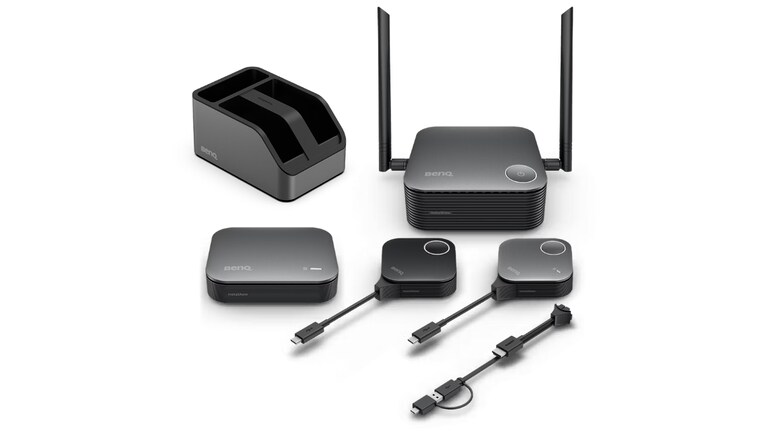

The InstaShow VS25 from BenQ is designed to remove friction from meeting room technology by turning wireless conferencing into a simple plug-and-play experience. Built as a driver-free and app-free system, it allows users to walk into a room, connect a button, and instantly present while accessing the room’s camera, microphone, and display. Rather than functioning as a basic screen-sharing tool, the VS25 positions itself as a wireless conferencing bridge built for modern hybrid work environments where speed, flexibility, and guest access matter and BenQ claims that it solves some of the biggest problems that users face in day-to-day live while conferencing. I happen to have a chance to use it in real-time and experience the product and here’s what I think.
Setup and everyday usability
One of the strongest early impressions comes from how little effort the system demands. There’s no software installation and that’s something that instantly makes this entire setup a breeze to setup. Considering software reliance often comes with risks and questions – whether the company is saving some data? Whether the data is secure or not, etc, etc. Moreover, it has no Wi-Fi configuration, and no IT intervention required for daily use once the setup is done.
So, here’s how it goes, the receiver connects to the/player display, while the multimedia hub links to cameras, microphones or video bars (yes, there’s the option to bring your own device – BenQ fancies it with BYOD . But, once paired, users simply plug in the host button into their device and tap to start presenting or hosting video meetings. And, if you are wondering, the top-end model supports up to 64 buttons and that’s a lot of buttons.
In real-world meeting scenarios, this could save several minutes per session — particularly in offices where guests or cross-team members frequently rotate through rooms. The simplicity feels designed for high-usage environments rather than occasional presentations.
BYOM support for hybrid meetings
Fancy terms does not end at BYOD – there’s BYOM as well and that’s what separates the VS25 from earlier wireless presentation tools is its focus on Bring Your Own Meeting (BYOM). Instead of being limited to screen sharing, users can run Zoom, Microsoft Teams or Google Meet directly from their laptops while wirelessly using the room’s professional camera and audio setup.
This effectively turns any meeting space into a flexible video conferencing room without fixed PCs or complex AV systems. Switching presenters also feels seamless, with multiple buttons allowing quick handovers during discussions.
Visual performance and responsiveness
When it comes to technicalities, the VS25 supports up to 4K output at 60fps, with smooth playback even for high-resolution videos and detailed presentations. In practice, motion appears fluid and text remains sharp — particularly useful for design reviews, financial dashboards, and video content with almost zero lag.
Touchback control is another practical addition, letting users interact directly with content from compatible interactive displays instead of returning to their laptops constantly. Although I did not experience it, having the feature improves the experience.
Security and IT-friendly design
Security appears to be a major priority. With WPA3 enterprise-level encryption, HDCP support, and CVSS 4.0 certification, the system is clearly targeted at corporate environments where data protection matters.
The use of a dedicated wireless chipset rather than standard screen-mirroring protocols also suggests more stable performance in busy office networks, reducing interference when multiple meeting rooms operate simultaneously.
From an admin perspective, cloud-based device management stands out. IT teams can remotely monitor systems, push firmware updates, and manage multiple rooms from a central dashboard. Swappable plugs on the buttons also simplify replacements and reduce downtime.
While some of these features roll out in phases, the overall ecosystem feels designed for long-term deployment rather than one-off installations.
Early takeaway
The BenQ InstaShow VS25 makes a strong first impression as a practical hybrid-meeting solution rather than just another wireless display tool. Its plug-and-play approach, BYOM integration, sharp 4K performance, and enterprise-level security create a system that prioritises speed, flexibility, and reliability. For organisations juggling in-office collaboration with remote participants, the VS25 appears well-suited to modern meeting workflows — especially where ease of use and fast room turnover are essential.


Discover the latest Business News, Sensex, and Nifty updates. Obtain Personal Finance insights, tax queries, and expert opinions on Moneycontrol or download the Moneycontrol App to stay updated!
Find the best of Al News in one place, specially curated for you every weekend.
Stay on top of the latest tech trends and biggest startup news.