




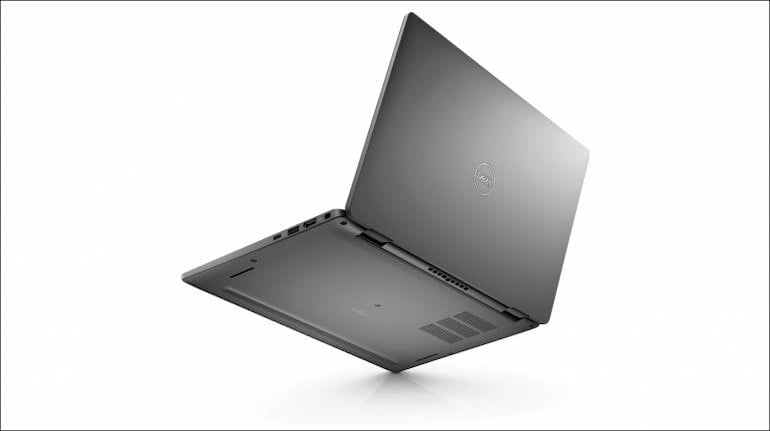
With 13.3’ display, Dell Latitude 7330 Ultralight is one of the thinnest and lightest laptops you can find. But would such a lightweight machine have the grunt to take on the workload of today’s professionals?
Powered by a vPRO-certified Intel Core i7-1265U, up to 32 GB of RAM, 512 GB of high-speed NVMe storage, and with Thunderbolt 4 support, the answer to that question is a very loud and resounding yes!
The 7330 Ultralight is a premium business laptop that has the power to take on all business needs without any disruptions. For example, as a journalist I tend to travel frequently and file stories on the move. I’m also required to access site-management tools and data analytics from time to time, not to mention engaging in meetings throughout the day, tracking emails and multiple Slack and WhatsApp groups, and more. For this, I need a laptop that’s light enough to carry anywhere, one with the grunt to handle a hundred Chrome tabs and Photoshop, and the battery life to not die in the middle of a critical story.
The 7330 worked brilliantly for all of the above, leveraging Intel’s powerful CPUs and a 41 Whr battery to get me through my day. When the battery does run out, ExpressCharge 1.0 support means that you get 80% charge – or a full workday’s use – from just an hour’s charge. I found myself charging my device more out of habit than necessity.
Dell Optimizer, an AI solution, works intelligently and quietly in the background to accelerate your work and enhance battery life even further. This could include prioritising browser tabs if you’re a heavy Chrome user, volume levels for meetings, and even peripheral management if you connect frequently to docks.
That’s not all. It may be light, but the 7330 is one of the toughest Ultrabooks I’ve ever used. There’s no flex in the chassis, and the 360° hinge is one of the most stable I’ve ever tested and doesn’t wobble in any orientation. The 7330 is even sustainable, thanks to the use of recycled materials in the packaging, bumpers, and battery frame, not to mention Energy Star 8.0 certification for efficiency.
You’ll find that a lot of thought has gone into the design of the laptop. You get an IR webcam and a fingerprint reader for enhanced biometric security, a physical privacy shutter so you’re comfortable working from anywhere, ExpressConnect Wi-Fi that lets you take advantage of multiple networks for seamless connectivity, and more. Audio is fantastic, the glass trackpad is a pleasure to use, and the backlit keyboard is wonderful to type on. The fan is especially notable in that you never hear it. Dell claims the new design is 30% quieter, but they might as well have said 100% because in all my days of testing it, plugged in and not, I didn’t hear it once.
My favourite feature though, is support for Thunderbolt 4. This diminutive laptop supports one of the fastest and most capable connectivity standards around, allowing me, and other professionals like me, the flexibility to connect peripherals via a powerful one-cable solution like Dell’s Thunderbolt and USB-C docks. When I need to work on data-heavy spreadsheets or research large projects, I simply walk up to my desk, plug a single cable into the laptop, and I’m now working across multiple displays with external peripherals. If I need to travel, I just unplug that cable and I’m free to roam with an ultralight laptop that disappears into my bag!
Speaking of bags, here are some useful accessories I’d recommend you pick up.
Dell MS7421W wireless mouse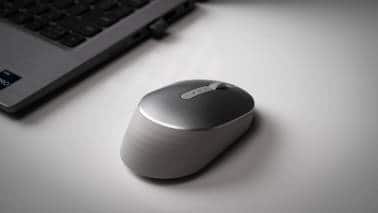
This is a must-have for anyone who uses a laptop. The MS7421W is a rechargeable wireless mouse that charges via USB-C. Dell also promises an astonishing 6 months of battery life, which basically means you charge the mouse once and then forget about it.
It’s a compact mouse and very well designed, ergonomically speaking. It conforms well to my hand and feels precise and comfortable to use. I also found that it tracked well on any surface, including normally challenging glossy tabletops. Connectivity is also simple, thanks to support from two Bluetooth profiles and an optional USB dongle that you can plug into any computer for instant pairing.
Dell Premier Wireless ANC Headset – WL7022
Now this is something I didn’t expect to get this excited about. I normally just use any convenient set of wireless earbuds for meetings, but I didn’t know what I was missing out on till I tried the WL7022. Though earbuds are usually convenient, they can feel uncomfortable over long periods. Their mics also tend to be passable. The WL7022, on the other hand, is an over-the-ear headset with a plush feel. The earpads are soft, and the headband has just the right tension to hold the set on your head without putting too much pressure on your ears. It comes with a handy charging dock that you just place the headset on, and connectivity can happen via Bluetooth or a convenient USB dongle.
The earcups are covered in buttons and dials to help you converse without needing to fiddle with settings on your PC. There’s a volume dial, a play/pause button alongside a rocker switch for prev/next tracks, a dedicated button to connect to and disconnect from calls, an ANC switch (yes, the headset supports active noise cancellation), and of course a rotating boom mic that improves the quality of your audio by moving the mic closer to your mouth.
It's extremely convenient to use when at a desk, and very comfortable for those long Teams sessions. Until now, I never realised how useful a purpose-built communications tool can be.
Dell 6-in-1 USB-C Multiport Adapter - DA305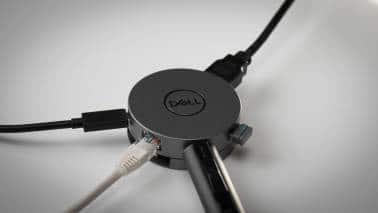
This unassuming puck is one of the most useful productivity tools I’ve had the pleasure of using. Technically, it’s a USB-C hub for the laptop, but when you start using it, you realise it’s a lot more than that.
It’s compact of course, but packs powerful ports. You don’t just get extra USB ports, you get HDMI, DisplayPort, RJ45 Ethernet, and even 90W power via USB-C and a compatible adapter. Both HDMI and DP support 4K 60 Hz output, the USB ports are all rated at 10 Gbps, and the Ethernet port is rated at 1000 Mbps. This diminutive adapter punches well above its weight class.
Dell Universal Dock UD22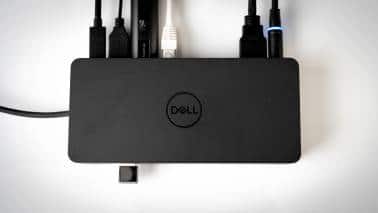
If you’re a power user who needs to work on multiple monitors, I’d heartily recommend the Dell Universal Dock UD22. This is a powered dock and hence meant for fixed desk use. It can deliver up to 96 W to your Dell laptop via the USB-C Power Delivery spec, supports a single 5K 60 Hz panel or four 4K 60 Hz monitors via DisplayLink, multiple 10 Gbps USB-C ports, gigabit Ethernet, and more. Since this is a USB-C dock, it’s compatible with most laptops, and even Chromebooks and Mac OS.
It is easily one of the most useful tools to have at your work desk.
EcoLoop Pro Briefcase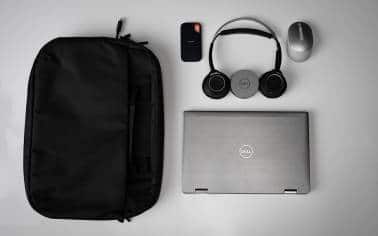 Dell
DellThe laptop bag I’ve opted for is the Dell EcoLoop Pro Briefcase. The design is simple and elegant, and the quality of its build is really good. Dell says that the exterior is made from 100% ocean-bound plastic, so that’s a win for the environment as well. It offers plenty of space for storage and is comfortable to carry on trips. You get a padded laptop compartment that can hold 16” devices, a section for files and other documents, and of course a front compartment for compact accessories like the MS7421W mouse or DA305 adapter.
ConclusionIf you’re a professional who needs to move around, the Dell Latitude 7330 Ultralight is the companion you need, and taking it a step further are the nifty assortment of peripherals that Dell offers.
As an on-the-go professional, you’re going to need a few accessories like a USB-C hub for various dongles and drives, a lightweight mouse for when the trackpad isn’t enough, and perhaps even a dock for multi-monitor home/office use. Dell offers excellent options for all of these, and they’re certainly worth investing in.
Moneycontrol Journalists were not involved in the creation of the article.
Discover the latest Business News, Sensex, and Nifty updates. Obtain Personal Finance insights, tax queries, and expert opinions on Moneycontrol or download the Moneycontrol App to stay updated!



