






Nvidia first announced FreeSync support on GeForce Pascal and Turing based cards during CES 2019. The move was aimed at letting Nvidia GPU owners use adaptive sync with a wide range of FreeSync monitors.
However, ‘wide range’ might seem a bit far-fetched, considering Nvidia had said only 12 out 400 monitors tested would be supported. But this isn’t entirely true as there are four tiers of Nvidia’s support for adaptive sync displays.
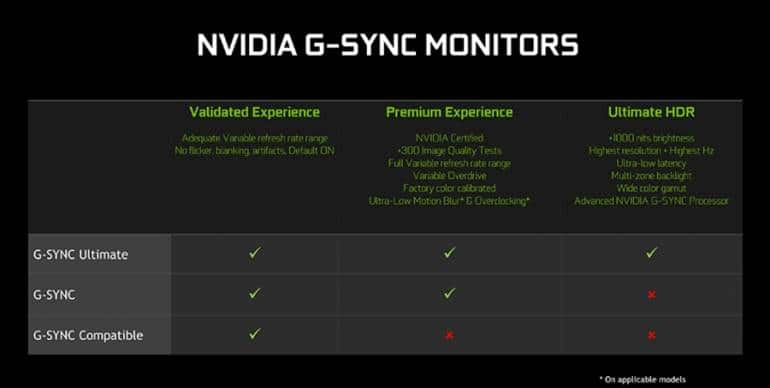
G-Sync UltimateG-Sync Ultimate is essentially G-Sync HDR. Monitors that boasts G-Sync Ultimate certification support the full suite of HDR features in Nvidia’s G-Sync HDR module.
Standard G-SyncStandard G-Sync monitors have been around for years. These adaptive sync monitors include a G-Sync module and work exclusively with Nvidia GPUs. They also demand a higher price tag than their FreeSync counterparts.
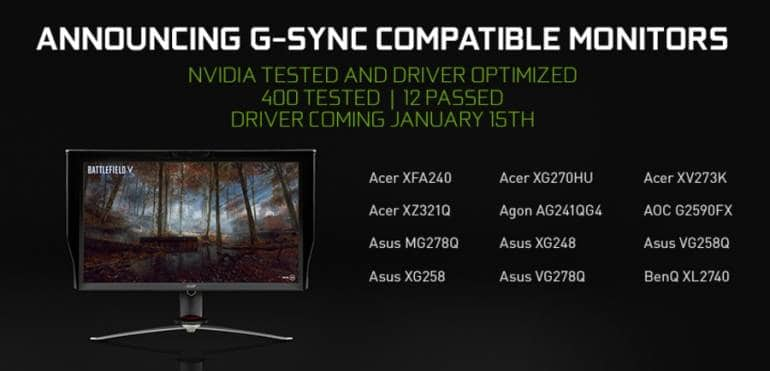
G-Sync compatible monitors are essentially FreeSync monitors that support VESA Adaptive Sync standard. These monitors pass stringent G-Sync performance metrics and work with AMD GPUs. With the latest Nvidia drivers, compatible monitors will work with adaptive sync on Nvidia GPUs by default.
An Unknown Fourth TierThe fourth tier lets you use any FreeSync or VESA Adaptive Sync monitor with an Nvidia GPU. This can be achieved via a toggle in the Nvidia Control Panel. According to Nvidia, this is for VRR monitors that are yet to be G-Sync compatible, and there’s no certainty that it will work. However, in reality, every adaptive sync monitor is now supported. All users have to do is enable the toggle.
At CES 2019, Nvidia went a long way to convince people that the G-Sync compatible program is essential by showing off FreeSync monitors with flickering and blanking issues. Nvidia claims the G-Sync compatible monitors they’ve certified do not have these issues, while any non-certified monitors likely will.
Well, that isn’t down to an issue with AMD's FreeSync or the VESA Adaptive Sync technology; instead, it’s down to the monitor manufacturers making bad products. If you book a monitor that flickers or has blanking issues, we’d recommend you return it immediately.


Discover the latest Business News, Sensex, and Nifty updates. Obtain Personal Finance insights, tax queries, and expert opinions on Moneycontrol or download the Moneycontrol App to stay updated!
Find the best of Al News in one place, specially curated for you every weekend.
Stay on top of the latest tech trends and biggest startup news.






