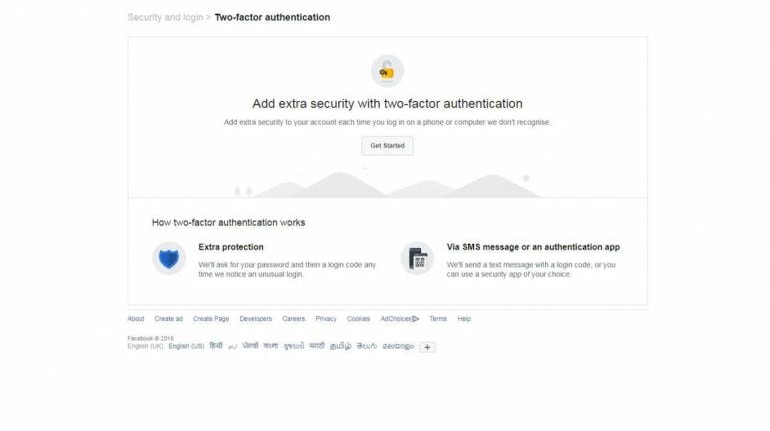
Social media giant Facebook is adding another security measure to protect accounts on its platform from being hacked. It enabled two-factor authentication while logging in.
“Two-factor authentication is a security feature that helps protect your Facebook account in addition to your password. If you set up two-factor authentication, you'll be asked to enter a special login code or confirm your login attempt each time someone tries accessing Facebook from a computer or mobile device we don't recognize,” the company said.
A user can also enable Facebook to send alerts to one’s mobile phones if an unknown person tries to log in from a computer Facebook does not recognise.
How to turn on two-factor authentication:
—Click on the downward arrow button on top-right corner of your homepage on Facebook
—Click on Settings and choose Security and Login from the vertical panel on the left
— Scroll down to use two-factor authentication and click Edit
—Click on Get started and enter your account password
—Select one of the two option provided: Text message or Authentication App
—If you pick ‘text message’ as your secondary security layer, you will be asked to enter a six-digit code. If you pick the app option, you will be asked to either scan the QR code or add a 16-digit code into any authentication app like DUO or Google Authenticator.
—Once entered, the two-factor authentication is on.
For the above method to work, the computer you generally use to login to your account should be saved. If you haven't saved the computer or mobile device you're using, you'll be asked to do so when you turn on two-factor authentication.


Discover the latest Business News, Sensex, and Nifty updates. Obtain Personal Finance insights, tax queries, and expert opinions on Moneycontrol or download the Moneycontrol App to stay updated!
Find the best of Al News in one place, specially curated for you every weekend.
Stay on top of the latest tech trends and biggest startup news.