

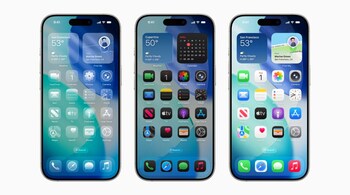
Apple has officially rolled out iOS 26 after months of beta testing, and it’s one of the most ambitious iPhone updates in years. The headline change is a brand-new design language called Liquid Glass, but the update goes well beyond just looks, packing intelligence, AI-powered tools, and lifestyle features that will change how you use your phone every day.
Liquid Glass
The first thing you’ll notice is Liquid Glass, Apple’s fresh take on transparency and light effects across the system. Icons, buttons, and menus now have a glossy depth that reacts dynamically as you interact with them. Subtle animations play when opening apps, swiping notifications, or unlocking the device. You can customise the experience further with new Lock Screen layouts, wallpapers, and the option for Clear or Tinted icons. It feels instantly modern and fluid.
Apple Intelligence upgrades
For iPhone 15 Pro users and newer, Apple Intelligence gets a big step up. Visual Intelligence now works system-wide: circle anything on your screen — whether it’s a pair of shoes on Instagram or an address in an email — and you’ll instantly get search results, directions, or calendar options. Tap the “Ask” button and ChatGPT integration kicks in, giving you deeper answers without leaving your screen.
ChatGPT and Image Playground
Speaking of ChatGPT, it’s now embedded into Apple’s Image Playground app. Users can type a prompt, pick ChatGPT as a style, and generate unique illustrations or Genmoji. Apple has also tuned its in-house models for sharper, more useful outputs.
AutoMix for Apple Music
Music lovers get AutoMix, a smart DJ for playlists. It analyses beats and tempo to blend songs into seamless transitions, giving even shuffled playlists a curated vibe.
Smarter call filtering
Another everyday win is call filtering. iOS 26 can auto-answer unknown numbers, ask the caller for their name and reason, and then let you decide whether to pick up.
How to update
iOS 26 works with iPhone 11 and newer, though some features remain Pro-only. Before updating, back up your device to iCloud, then head to Settings > General > Software Update.
Discover the latest Business News, Sensex, and Nifty updates. Obtain Personal Finance insights, tax queries, and expert opinions on Moneycontrol or download the Moneycontrol App to stay updated!





