

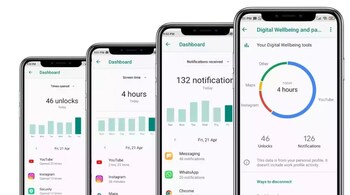
Many of us find ourselves scrolling on multiple apps or social media websites for long hours. This term is usually known as doomscrolling, and Google now aims to help users avoid getting sucked into their favourite apps for hours on end. The company has now introduced a new feature in Android called ‘Screen Time Reminders’ to help Android users manage their time better as a part of the Digital Wellbeing suite.
How to enable ‘Screen Time Reminders’
A user can access the ‘Screen Time Reminders’ feature by going into Settings > Digital Wellbeing > Screen time Reminders section on their Android device. Then select the Use Reminders toggle. After that, you can check or uncheck the apps for which you want this feature to be enabled or disabled.
The ‘Screen Time Reminders’ feature will then display a small pop-up notification at the top of the screen after a user spends an extended amount of time on the selected apps. Unlike the app time limits in the Digital Wellbeing section, these reminders will appear sporadically, making them feel like a gentle reminder to reflect on how long you are using a particular app.
Further, these reminders can also be turned off for specific apps where extended sessions might be intentional, such as video streaming apps. Google’s Digital Wellbeing tools are already available not only on Pixel smartphones but also on a host of other Android devices, including OnePlus, OnePlus, Nothing, and more. However, according to 9to5Google, Samsung’s version of Digital Wellbeing doesn’t yet include the ‘Screen Time Reminders’ function.
Discover the latest Business News, Sensex, and Nifty updates. Obtain Personal Finance insights, tax queries, and expert opinions on Moneycontrol or download the Moneycontrol App to stay updated!





