

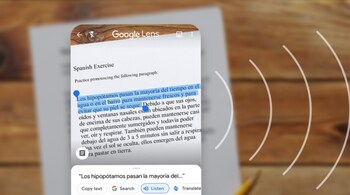
Google recently added some new productivity features to Google Lens, giving users the ability to copy handwritten notes from a phone to a computer, quickly learn new concepts and learn how to pronounce new words. These features are already rolling out for Android and iOS users.
To use the new features in Google Lens, you will need to have the latest version of Chrome and the standalone Google Lens app on your Android device. iOS users will need to have the Google app, which allows you to access the Lens through a button next to the search bar. Additionally, you will have to be logged into a Google account irrespective of what device you are using.
Copy Handwritten Text
You can simply point your camera to any handwritten text, highlight it on the screen and select “copy to computer”. Then, go to any document in Google Docs and paste the text. So long as Google deems your handwriting neat enough to understand, it should work like a charm.
Pronounce words or phrases
You can now use Google Lens to practice new words or phrases that are difficult to say. All you need to do is select the text with Lens and tap the new Listen button and Google will read out the text. Lens can already be used to translate words in over 100 languages by pointing the camera at the text; this new feature is aimed at helping you pronounce words in foreign languages.
Look up new concepts
If you come across a word or phrase in a book or newspaper you do not understand, Google Lens offers a quick learning solution. In-line Google Search results will allow you to select complex phrases or words and learn them quickly.
Discover the latest Business News, Sensex, and Nifty updates. Obtain Personal Finance insights, tax queries, and expert opinions on Moneycontrol or download the Moneycontrol App to stay updated!





