-
My Account









How to file Income Tax Returns online in five simple steps
While filing ITR, it is always better to keep few things readily available with you like - Aadhaar number, PAN Card, Bank details and other investment documents




1/6

Filing ITR every year is very important for every individual who is an assessee. While filing ITR, it is always better to keep few things readily available with you like - 12-digit Aadhaar number, PAN Card, bank details and other investment documents.
You can easily file your own ITR through e-filing portal using these 5 simple steps
You can easily file your own ITR through e-filing portal using these 5 simple steps
2/6

Step 1: Visit the e-filing website at https://incometaxindiaefilling.gov.in. If you have already registered yourself, you need to click on the ‘Login Here’ to proceed further to e-filing portal.
3/6
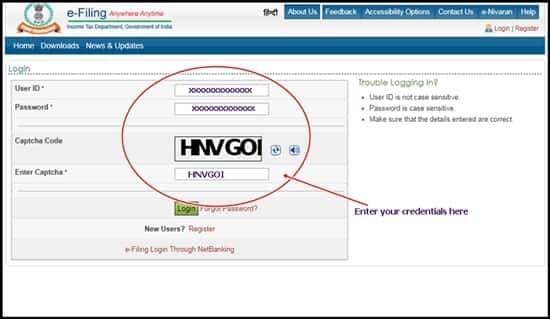
Step 2: Once you will proceed towards the ‘Registered User’ tab and click on the ‘login’ virtual switch, you will be directed to the next window where you need to enter your User ID (which is your PAN number), password, date of birth and auto-generated captcha.
4/6
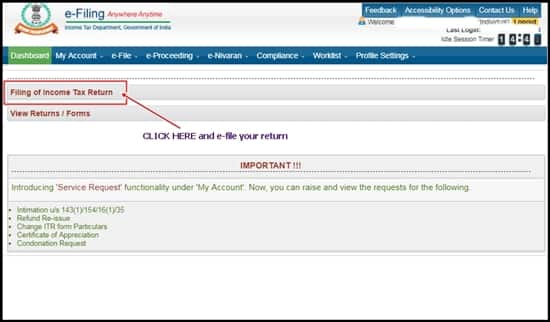
Step3: After entering all the credentials successfully, clicking on the login tab will proceed you towards a new window. Here you can view your previous/current history of ITR’s and also, by clicking on ‘filing of ITR’ will help you proceed further taking you to a new window where you can file your new ITR.
5/6

Step3: After entering all the credentials successfully, clicking on the login tab will proceed you towards a new window. Here you can view your previous/current history of ITR’s and also, by clicking on ‘filing of ITR’ will help you proceed further taking you to a new window where you can file your new ITR.
6/6

Step 5: Once you are done, submit the form and get your acknowledgement receipt within a stipulated time frame.
Discover the latest Business News, Budget 2025 News, Sensex, and Nifty updates. Obtain Personal Finance insights, tax queries, and expert opinions on Moneycontrol or download the Moneycontrol App to stay updated!



