

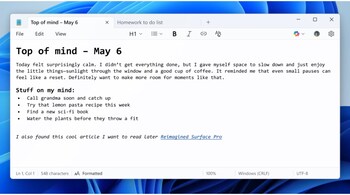
After putting it on the back burner for years, Microsoft is giving its once-popular app a serious makeover. We are talking about the Notes app. First it was AI tools and now come the formatting options. Rolling out to Windows 11 Canary and Dev Channel testers, the latest update adds rich text formatting features including bold, italics, hyperlinks, and even Markdown support—marking a major shift from Notepad’s traditionally minimal design.
The update introduces a new formatting toolbar at the top of the app, joining the classic File, Edit, and View menus. Users can now apply styles like headings and lists or toggle between a formatted Markdown preview and raw syntax. “You can switch views in the View menu or via a new toggle in the status bar,” explained Dave Grochocki, principal product manager lead for Microsoft’s Windows inbox apps.
To get started, use the new formatting toolbar to apply formatting as you type or to selected text, including bold and italic styling, hyperlinks, and support for simple lists and headings.
For purists, there’s a simple option to clear all formatting or even disable the new features entirely in Notepad settings. This follows closely on the heels of Microsoft’s AI-powered Write tool, which drafts text from prompts. Notepad is starting to resemble a lightweight Word—just without the clutter.
Discover the latest Business News, Sensex, and Nifty updates. Obtain Personal Finance insights, tax queries, and expert opinions on Moneycontrol or download the Moneycontrol App to stay updated!





