

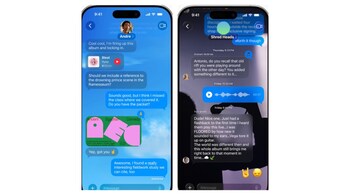
After years of waiting (and watching WhatsApp users do it), iPhone owners finally get the ability to personalise their Messages app with custom conversation backgrounds in iOS 26. It’s one of the most user-facing changes in Apple’s latest software update—and a long overdue one.
The feature lets you assign a specific look to each conversation, whether it’s a favourite photo, a bold colour, or a whimsical image generated via Apple’s new Image Playground tool. So yes, you can now give your family group chat a warm sunset photo, use a clean grey tone for work chats, or drop an AI-generated duck wearing sunglasses into a thread with your friends. The change applies across the entire thread—for everyone in the chat.
It’s more than just visual flair. With many people juggling dozens of conversations at once, custom backgrounds double up as a subtle organisational tool. And since they sync across devices (iPad and Mac, assuming they’re on iPadOS 26 or macOS Tahoe), your settings stay consistent.
How to set a custom background
Open Messages, tap into a conversation.
Tap the contact or group name at the top, then tap Backgrounds.
Choose from Photo, Color, Playground, or Apple’s themed options like Sky or Aurora.
Swipe to preview styles, then hit the check icon to apply.
Resetting to Default
Go to the same Backgrounds screen and select None to go back to Apple’s default look.
Pro tips
Pick backgrounds that won’t clash with text bubbles—dark photos for light text and vice versa.
iOS 26 auto-adjusts contrast, but it’s not foolproof.
This feature is live in the iOS 26 beta and will roll out to everyone later this year.
Discover the latest Business News, Sensex, and Nifty updates. Obtain Personal Finance insights, tax queries, and expert opinions on Moneycontrol or download the Moneycontrol App to stay updated!





