

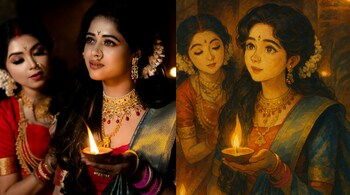
Turning Diwali photos into Ghibli-like frames is now possible through AI models that support style transfer via text prompts. Unlike filters, these models reinterpret shapes, depth, fabric and light with a painterly logic rather than just overlaying textures.
Step-by-step guide to convert your photos into Ghibli art using ChatGPT
Start with a photo that has clear subjects and clean edges: people around diyas, rangoli in foreground, terrace crackers, or inside-home portraits. Crop distractions before prompting; AI respects starting composition but exaggerates noise and clutter. Keep faces lit and expressions visible because the model needs readable contours to redraw them in a stylised ink-and-paint form.
Things to keep in mind before you prompt
AI Ghibli results collapse easily when the source is too dark, backlit or motion-blurred. Avoid photos with blown highlights from diyas or sparklers since painted simulations do not re-invent missing luminance texture. If you want the art to remain recognisable, request “preserve likeness” or “keep faces true to subject” inside prompt.
The right prompt — structure matters more than adjectives
A usable prompt skeleton is: [Target style] + [Scene description] + [Selective constraints] + [What not to do]
For example:
“Ghibli style 2D painted frame of a Diwali courtyard at night with diyas on steps and warm lanterns, preserve subject likeness and clothing shapes, avoid surreal distortions or extra characters.”
You can tune intensity with a second instruction like “apply style at 60–70% strength” or “keep lighting physically plausible”.
After the first generation, use an upscaler to add line cleanliness instead of regenerating with a new style prompt, which often changes faces and breaks continuity. For a full album, save your prompt and only rotate the scene clause (terrace crackers / family around rangoli / balcony with torans) so the aesthetic vocabulary stays constant across frames.
Ghibli conversion works best when you push style deliberately but cap invention. Treat prompt as a contract: describe what is allowed, what must be preserved, and what must not appear, and the painterly look will remain believable rather than ornamental.
Discover the latest Business News, Sensex, and Nifty updates. Obtain Personal Finance insights, tax queries, and expert opinions on Moneycontrol or download the Moneycontrol App to stay updated!





