

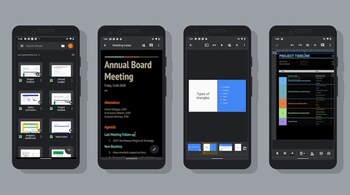
Google has begun rolling out dark mode for the Docs, Sheets, and Slides apps on Android to match Android 10’s dark theme. According to Google, all Android users will be able to access the dark theme on the Docs, Sheets, and Slides apps within the next two weeks.
Last year, Google promised that it would make dark mode available on all first-party apps, and it is slowly making good on that promise. If dark mode for the Docs, Sheets, and Slides apps are not yet available, you will likely receive it in the coming days. Want to activate the dark mode on Google Docs, Sheets or Slides; here’s is how to do it.
The dark mode is only available for the mobile version of these apps. You can head to the settings and manually turn on dark mode for these apps. Firstly, you will have to install or update to the latest version of the Docs, Sheets, or Slides app on your Android device. Once the apps have been updated, they will default to the theme of your operating system. So, if your Android phone uses a system-wide dark theme, the apps will automatically open in dark mode.
However, you can manually toggle between the new dark mode and standard light mode by heading to the menu in the corner, select “Settings”, then simply choose "Theme", and tap "Dark". If your device does not support system-wide dark mode, you will have to toggle the dark mode for these apps manually.
Discover the latest Business News, Sensex, and Nifty updates. Obtain Personal Finance insights, tax queries, and expert opinions on Moneycontrol or download the Moneycontrol App to stay updated!





