

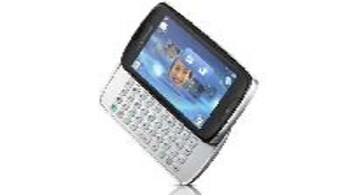
With budget phones getting smarter all the time Sony Ericsson has decided to launch a variant of their popular Xperia Mini series sans Android, so enter the Txt Pro. It looks similar to the Xperia X10 Mini Pro (not to be confused with the Xperia Mini Pro)but is not of the smartphone variety. The question is, with smartphones being priced quite well these days and options easily available in the low budget segment, how does this device stake its claim in this area? That’s what we’re here to tell you, so here’s a closer look at the Sony Ericsson Txt Pro.Form Factor Although it bears some resemblance to the Xperia Mini Pro that was recently announced, the Txt Pro is not nearly as sophisticated. The Txt Pro is also equipped with a 3-inch capacitive touchscreen display but has a slightly lower resolution at 240 x 400 pixels. Sony Ericsson says that the display is resistant to scratches but that’s just not true as the first few days of putting and removing from my pocket revealed small but significant lines on the screen. It’s recommended you get a scratch guard irrespective of what the companies say. The micro USB charging/interfacing port is located at the top right beside the 3.5mm handsfree socket and the power/screen lock button. The power button should have been raised a bit as it’s not the easiest to access when required. On one side are the volume rocker and camera keys. A singular Home button that’s almost feather touch-like, is at the bottom center of the device under the display.
The slider is a big issue. It’s sticky and sounds like it’s scraping the under portion of the device when being opened or shut. It’s not as slick as the X10 Mini Pro’s and the keys on the Txt Pro are also not as comfortable to use. It looks as if there’s still so much un-used space on either side which could have been used for a much larger keypad. It’ll take a little while getting used to but not too long. The lack of a hot swap slot for the microSD card could also be considered a bit of a drawback.
On the whole, the matt finish body looks quite plastic-y and although it looks quite neat, Human Curvature design and all, the slightly sticky slide out keypad tends to be quite a turn off. Features and PerformanceInterfaceSony Ericsson is using a rather well designed (to an extent) touchscreen based Java OS. Their four-corner allows for multiple page desktop creation which can make it quite convenient to access incoming messages and calls sitting in your mailbox or log respectively. The touchscreen capabilities and overall UI functionality is quite fluid and that includes the auto rotation of the display. However, since all of our test media cards were loaded up with HD videos the handset was unable to even process the data well enough and kept restarting each time the video gallery was being accessed.
Now this is not a smartphone as mentioned, but it does however try quite hard to employ characteristics of a Sony Ericsson Xperia styled device. Multiple desktops are auto-created for reading unread messages or notifications and the lock screen has a transparent display that clearly indicates missed calls or messages. A Time-Scape-ish app called ‘Friends’ is also added for you assign up to a maximum of 5 favorite contacts and easily access their data from this page. This includes details from their FB or Twitter accounts, and even recent calls and messages. Like their Android UI, the Text Pro also has a slide up menu with multiple pages and an alphanumeric on screen keypad. The screen is well calibrated making response time and accuracy quite good.
One rather odd situation you’ll find yourself in is that the display has an auto time-out feature that didn’t seem to have a setting for adjusting the timer. Very strange. It seems like it was simply forgotten. It’s set to15 seconds which is not necessarily enough. There’s also no option for changing the four-corner shortcuts so you’re stuck with Messages, the Browser, Dialer and Phone book whether you like it or not. Not that these aren’t optimum choices. MediaThe Txt Pro’s media capabilities are quite limited – it supports most popular audio formats like - MP3, WAV, WMA, AMR and eAAC+. Like some of the ultra low budget Java mobiles, the Txt Pro also has audio settings that aren’t accessible via the music player itself but rather through the handsets main settings menu where a few presets are available. The overall audio quality is really good even if the edible level is on the slightly lower side. The bundled handsfree serves its purpose well enough although a better set of earphones would definitely make for a more enjoyable experience. The FM radio was average at best with a fair amount of reception when you’re stationary and outside. While indoors and while travelling, it’s not too easy to get a signal. Sound quality on calls for users on both ends is clear and crisp.
When it comes to video, the handset can only handle low res (320 x 240) MP4, H.263 and 3GP video formats. It’s not the most comfortable screen to watch lengthy clips on so it’s recommended that you try and stick to YouTube length clips and short episodes, preferably not back to back. A voice recorder that can easily pick up vocal from about 2 feet away is also provided. A few Java-based games like Quadrapop, BB Revolution, Nightclub Fever and Music Quick app are also thrown in. ConnectivityThe Txt Pro is not a 3G capable handset which means you’ll have to suffice with EDGE/GPRS speeds when you’re on the go. While indoors and in the vicinity of a Wi-Fi connection you can easily switch modes to save yourself some stress to your bill. Sony Ericsson has tried to make this handset as social networking friendly as possible. However other than the free to download Facebook app that’s available and other third party apps like Snaptu that you’ll have to get yourself, pre installed icon links to FB, Twitter, Orkut, Mobile Gmail and Yahoo! Mail (stand alone email apps also on board) are included. Gtalk and Picasa apps are available and a link to download eBuddy for multiple IM chatting is as well. You can opt to use the native browser or Opera Mini that’s preloaded. Both are equally versatile and handle quite well. Other connectivity options include Bluetooth with A2DP and USB 2.0.
Misc. featuresIn terms of extras the handset is adequately fitted with features that include a stopwatch with Lap timer and a Timer app that also has a built-in notification setting. A few others thrown in are the calculator and Sony’s Track ID, that lets you record a clip of a track playing from an external source and get details about the artist, song, album etc. from an online directory. Other apps include a note pad, calendar for leaving memos and an alarm clock. CameraA 3.2MP fixed focus camera is strapped onto the rear of the Txt Pro. It has no adjustable settings and pretty much defines the term – Point and Shoot. It shoots video in QVGA resolution and can also be scaled down to MMS size if required. Image quality is not bad as far as lower budget devices go. Colors look quite well maintained even in indoor conditions and images are quite sharp for a camera in this segment. There’s a fair amount of focus overall except when you’re trying to take close ups. A Send-to-web function allows you to either email, message, transfer the picture via Bluetooth or upload it to your Picasa album.
BatteryIn our series of battery tests, the Txt Pro ran for a total of 4 hours and 15 minutes playing videos consecutively. That’s about average. In our tech2 Loop tests that consisted of two hours of audio, two hours video and 1.5 hours of talk time, the handset successfully completed one loop. A second Loop that consists of 1 hour of video playback, one hour of audio and one hour of talk time was left incomplete. The Txt Pro provided one hour of video with 50 minutes of music. The loops are run back to back so the Txt Pro was able to provide 7 hours and 20 minutes of non stop usage which is not too shabby for a 1000mAh battery. In real time it was capable of providing a full day of usage with included a bit of net connectivity as well.
Bottom LineThe Sony Ericsson Txt Pro bears a Rs. 7,500 price tag which makes this a slightly difficult pill to swallow. While the functionality of the handset is not really in question, and of course there are plenty of Java apps out there to add to its operation, the slider is not really the smoothest out there for one. The lack of settings to control features like the backlight timer and camera features also makes it a bit of an issue.
All that being said, the Txt Pro is otherwise a pretty decent device that’s quite well designed, has a keypad that you can get used to quickly and even has quite a user friendly interface. Do keep in mind that for a little bit more you could have a smartphone like the LG Optimus One. Other choices like the Nokia X3-02 Touch and Type would also make good option with much sharper display minus a QWERTY keypad and full touchscreen.
Discover the latest Business News, Sensex, and Nifty updates. Obtain Personal Finance insights, tax queries, and expert opinions on Moneycontrol or download the Moneycontrol App to stay updated!





