

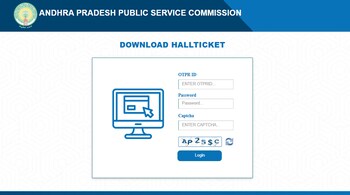
The Andhra Pradesh State Public Service Commission (APPSC) has announced that the hall tickets for the Group 2 Mains Examination will be available for download starting today, February 13, 2025. Candidates who have qualified for the mains exam can access their admit cards on the official APPSC website (https://psc.ap.gov.in).
The Group 2 Mains Examination is set to be conducted on February 23, 2025, across 13 district centers in the state. The examination will be held in two sessions: Paper-I from 10:00 AM to 12:30 PM and Paper-II from 3:00 PM to 5:30 PM. The exams will be conducted in an offline, objective-type format. Only the hall ticket sheet is required to be carried to the examination centre; other instruction sheets need not be brought along. Additionally, candidates are urged to locate their allocated exam venues beforehand to ensure timely arrival on the day of the examination.
Steps to download APPSC Group 2 Mains Hall Ticket:
Step 1. Visit the Official Website: Go to the APPSC's official website at https://psc.ap.gov.in.
Step 2. Navigate to the Hall Ticket Section: Look for the "Hall Ticket" or "Download Admit Card" link on the homepage.
Step 3. Select Group 2 Mains Exam: Click on the link specific to the Group 2 Mains Examination 2025.
Step 4. Enter Login Details: Enter your registration number, date of birth, or other required credentials as prompted.
Step 5. Submit and View Hall Ticket: After entering the details, click on the “Submit” button to view your hall ticket.
Step 6. Verify Details: Carefully check all the details on the hall ticket, including your name, exam date, time, and venue.
Step 7. Download and Print: Download the hall ticket and take a printout for future reference. Ensure the printout is clear and legible.
Direct Link: APPSC Mains Hall Ticket for Group 2
The APPSC had initially issued the notification for the Group 2 Mains examination on January 5, 2024, with the application window open from December 21, 2023, to January 10, 2024. The preliminary examination was conducted on February 25, 2024, following which 92,250 candidates qualified for the mains exam. However, the main examination faced multiple postponements before being rescheduled to February 23, 2025.
A total of 905 vacancies will be filled through this recruitment drive, making it a highly competitive examination. Candidates are encouraged to stay updated with the official APPSC website for any further announcements or changes related to the examination process.
Discover the latest Business News, Sensex, and Nifty updates. Obtain Personal Finance insights, tax queries, and expert opinions on Moneycontrol or download the Moneycontrol App to stay updated!





