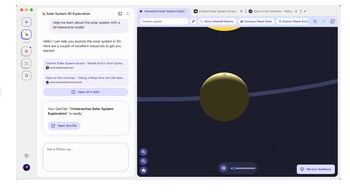
What GenTabs is and why Google is testing itGoogle is testing GenTabs as part of an experimental browsing experience called Disco, developed under Google Labs. GenTabs is built using Gemini 3, Google’s latest large language model, and is designed to address a common browsing problem: managing complex tasks across multiple open tabs. Instead of users manually switching between dozens of webpages, GenTabs proactively understands the intent behind open tabs and recent chat history. Based on this context, it creates task-specific interactive web applications directly inside the browser, turning passive webpages into functional tools.
How Gemini 3 powers GenTabs inside ChromeGemini 3 plays a central role by analyzing open tabs, extracting relevant information, and understanding what the user is trying to accomplish. Using natural language prompts, users can describe what they want to do—such as planning a trip, researching a topic, or organizing information—without writing any code. Gemini 3 then assembles a custom GenTab that pulls verified data from the web, links back to original sources, and updates dynamically as new tabs are added or removed.
Story continues below Advertisement
How GenTabs changes traditional web browsingTraditional browsing relies on static webpages and manual effort. GenTabs shifts this model by converting browsing sessions into interactive experiences. For example, instead of bookmarking articles and switching between tabs, GenTabs can generate a single interface that summarizes content, compares data, or structures information into usable formats. This reduces tab overload and allows users to complete tasks directly within the browser, rather than relying on external apps or extensions.
Real-world use cases Google is highlightingEarly testers are using GenTabs for tasks such as creating weekly meal plans, organizing travel itineraries, and building learning tools for students. Each GenTab functions like a lightweight web app tailored to a specific goal. Importantly, these tools remain connected to the web, ensuring transparency by linking back to original articles, videos, and sources rather than replacing them with standalone AI outputs.
Availability, limitations, and what comes nextGenTabs is currently available through a waitlist for Disco, starting on macOS, and is being tested with a limited group of users. Google has stated that the experiment is early and may not always work as expected. Feedback from testers will determine whether GenTabs evolves into a broader Chrome feature. The most effective ideas could eventually be integrated into mainstream Google products, reshaping how users browse, research, and complete complex online tasks.
Story continues below Advertisement
Discover the latest Business News, Sensex, and Nifty updates. Obtain Personal Finance insights, tax queries, and expert opinions on Moneycontrol or download the Moneycontrol App to stay updated!