

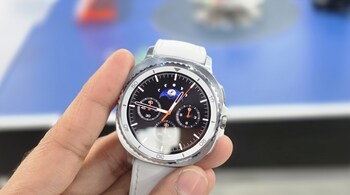
Apple will soon make it easier for Galaxy Watch users to pair their devices with iPhones, but only if you live in the European Union. As per MacRumours, the European Commission today praised Apple for the changes it is bringing in iOS 26.3, saying the update will open new doors for users and wearable brands in Europe. And as expected, the credit for pushing Apple to make these changes once again went to Europe’s Digital Markets Act.
So what’s changing? The biggest update is something Apple calls proximity pairing. Right now, pairing a non-Apple wearable or audio device to an iPhone often means going into settings, tapping multiple menus, waiting for codes, and repeating steps. Apple wants to change that experience for third-party device brands in the EU. With iOS 26.3, wearable and accessory brands can test a faster, cleaner way to connect. Just bring the device close to an iPhone or iPad, tap once, and it’s paired. It will feel a lot like how AirPods connect today. No long setup screens, no extra clicks.
The second big change is notifications. At the moment, only Apple Watch users get full iPhone notifications on their wrist, including the ability to react or reply. But in Europe, wearable brands like Samsung will soon be able to test this feature too. Galaxy Watches will be able to receive iPhone notifications, show them on screen, and even allow users to reply or react from the watch.
There is one rule users should know. iPhones will send notifications to only one connected device at a time. So if you turn on notifications for a Galaxy Watch, your Apple Watch will stop getting them. And if you turn them back on for the Apple Watch, the Galaxy Watch won’t receive them anymore. It’s a toggle, not a shared stream.
Developers and device makers can already begin testing these features in Europe, and the Commission says everything will be fully available to EU citizens in 2026. The Commission also said this update is another step toward a more connected digital world for European users.
iOS 26.3 is expected to roll out at the end of January, likely by late January, or early February, with a launch planned by Apple before the month ends. For now, these changes are not available outside the EU, and iPhone users in India or other countries won’t see the update for third-party wearables yet.
For wearable brands, this is a huge win. For users in Europe, it means more choice and a much easier way to connect their favourite devices to an iPhone.
Discover the latest Business News, Sensex, and Nifty updates. Obtain Personal Finance insights, tax queries, and expert opinions on Moneycontrol or download the Moneycontrol App to stay updated!





