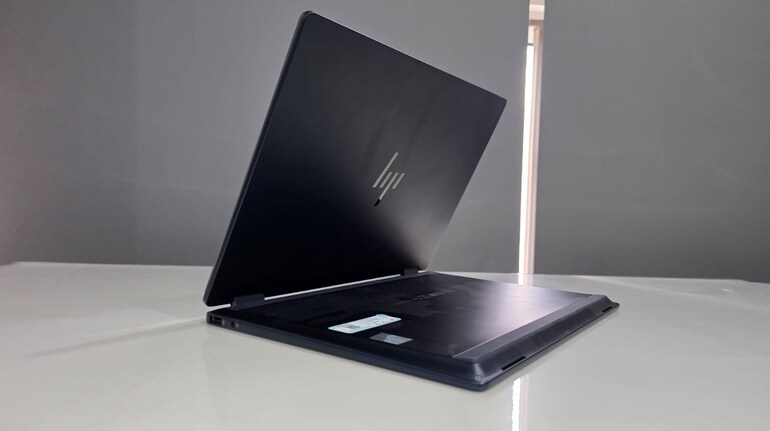
Rating: 7.5/10
Some laptops feel like they’re meant to stay put — perfectly happy on a desk, plugged into a monitor, untouched for hours. Others are built for the occasional Netflix binge or light typing on the go. But the HP OmniBook X Flip doesn’t belong to either extreme. It’s made for the in-between moments — the unexpected ones. The 20-minute brainstorm in the backseat of a cab. A photo edit on the floor during a shoot. The midnight sprint to polish a deck, switch to tablet mode, sketch an idea, and flip back without thinking twice.
That’s where this machine lives: in motion. Over the last two weeks, I’ve used it on a desk, in bed, on a balcony, even halfway through airport security — and not once did it feel out of place. It’s not just the hinge or the weight or the spec sheet. It’s the way everything comes together quietly, without friction. This isn’t a device you adapt to — it adapts to you. Here is a detailed review of the new HP laptop. The variant I am testing costs Rs 1,45,999, and the Omniboox X Flip starts at Rs 1,14,999.
 HP Omnibook X Flip
HP OmniBook X Flip: Design and display
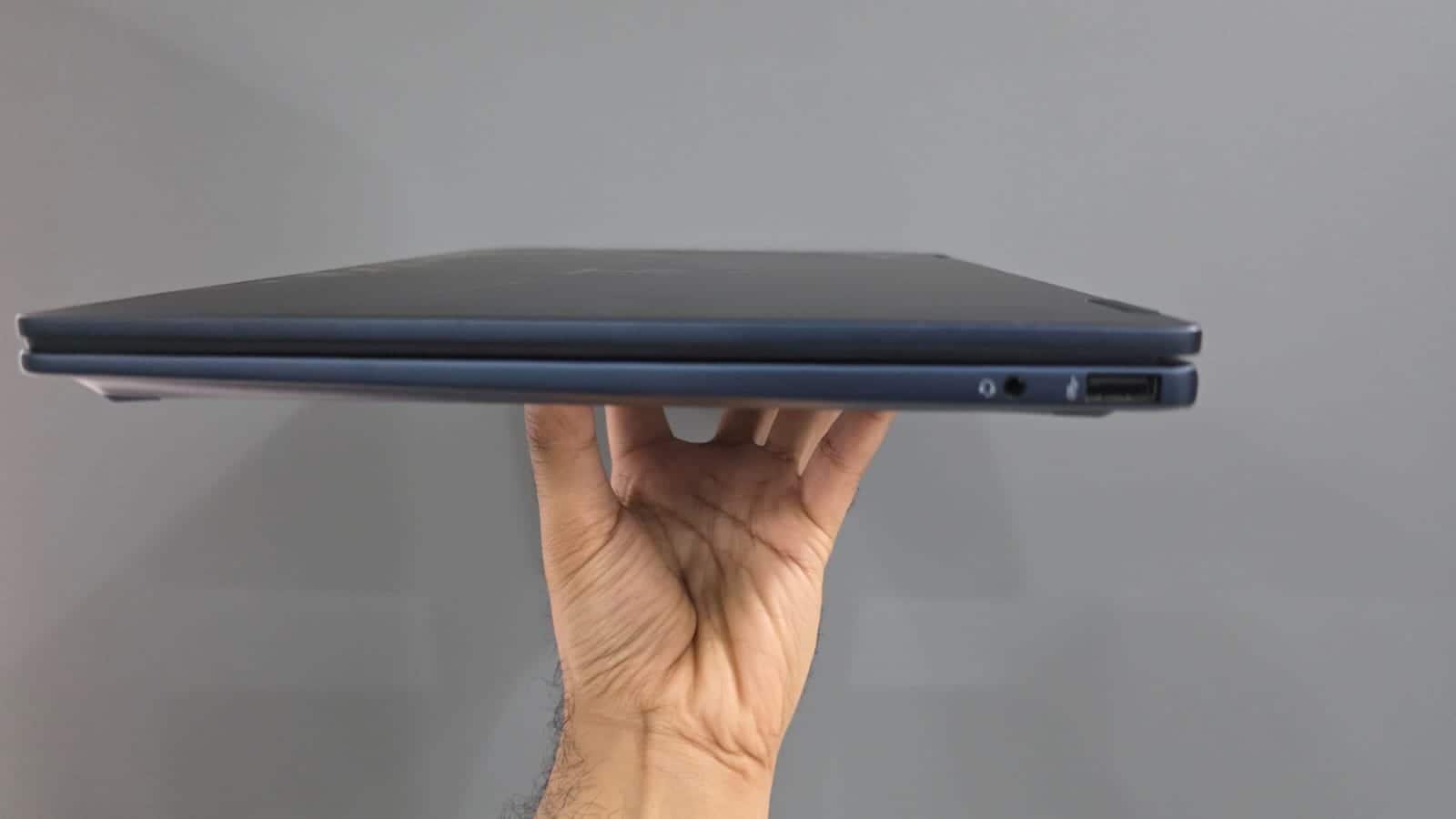
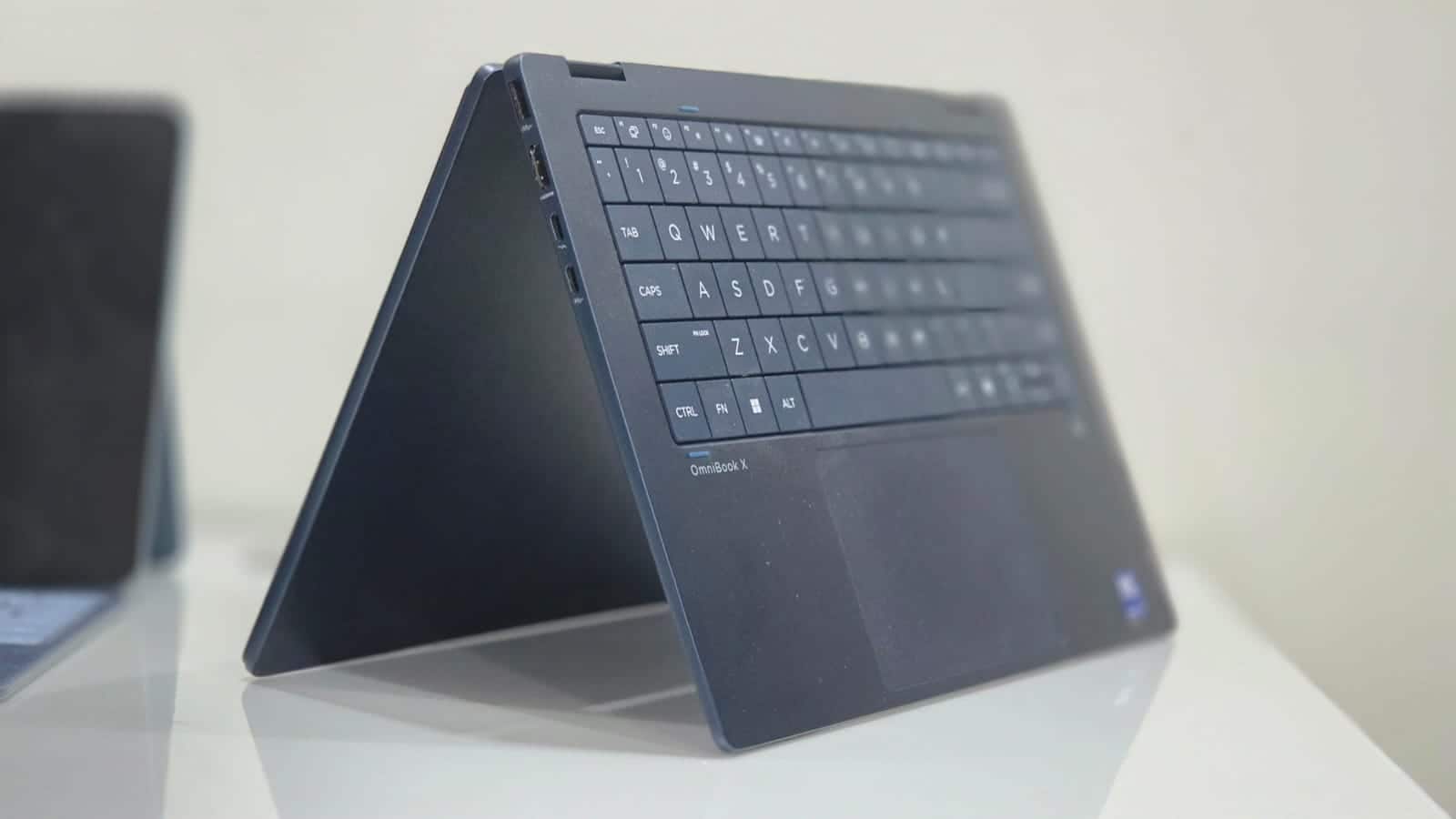
At 1.38kg, the OmniBook X Flip is almost deceptive in its build. It feels light in the hand, yet sturdy enough that you don’t second-guess tossing it into a backpack. The “Atmospheric Blue” finish is elegant without being too loud, and the anodised aluminium chassis carries a texture that’s comfortable to hold and fingerprint-resistant to a fair extent. The 360-degree hinge is the real star of this chassis, offering smooth transitions between laptop, tent, stand, and tablet modes. The hinge resistance feels perfectly tuned—not too stiff, not too loose—and that matters when you’re switching modes several times a day.
The 14-inch OLED display with a 3K resolution (2880 x 1800) is among the best I’ve seen in this category. The colours are vibrant, blacks are deep, and the sharpness is enough to make text, photos, and video look immaculate.
Whether I was working on presentations, watching a late-night movie, or just scrolling through a visual-heavy timeline, the panel didn’t miss a beat. The dynamic refresh rate (48Hz–120Hz) helps keep things fluid without draining too much power unnecessarily. I also found the touch layer to be impressively responsive, particularly when using an active stylus for quick markups or handwritten notes. Or while editing some photos on Photoshop.
HP’s use of Corning Gorilla Glass 3 here helps with peace of mind. I tossed the laptop into my bag with keys a couple of times and walked away without regret. The anti-reflective coating keeps most glare at bay indoors, though it still struggles a bit under harsh sunlight.
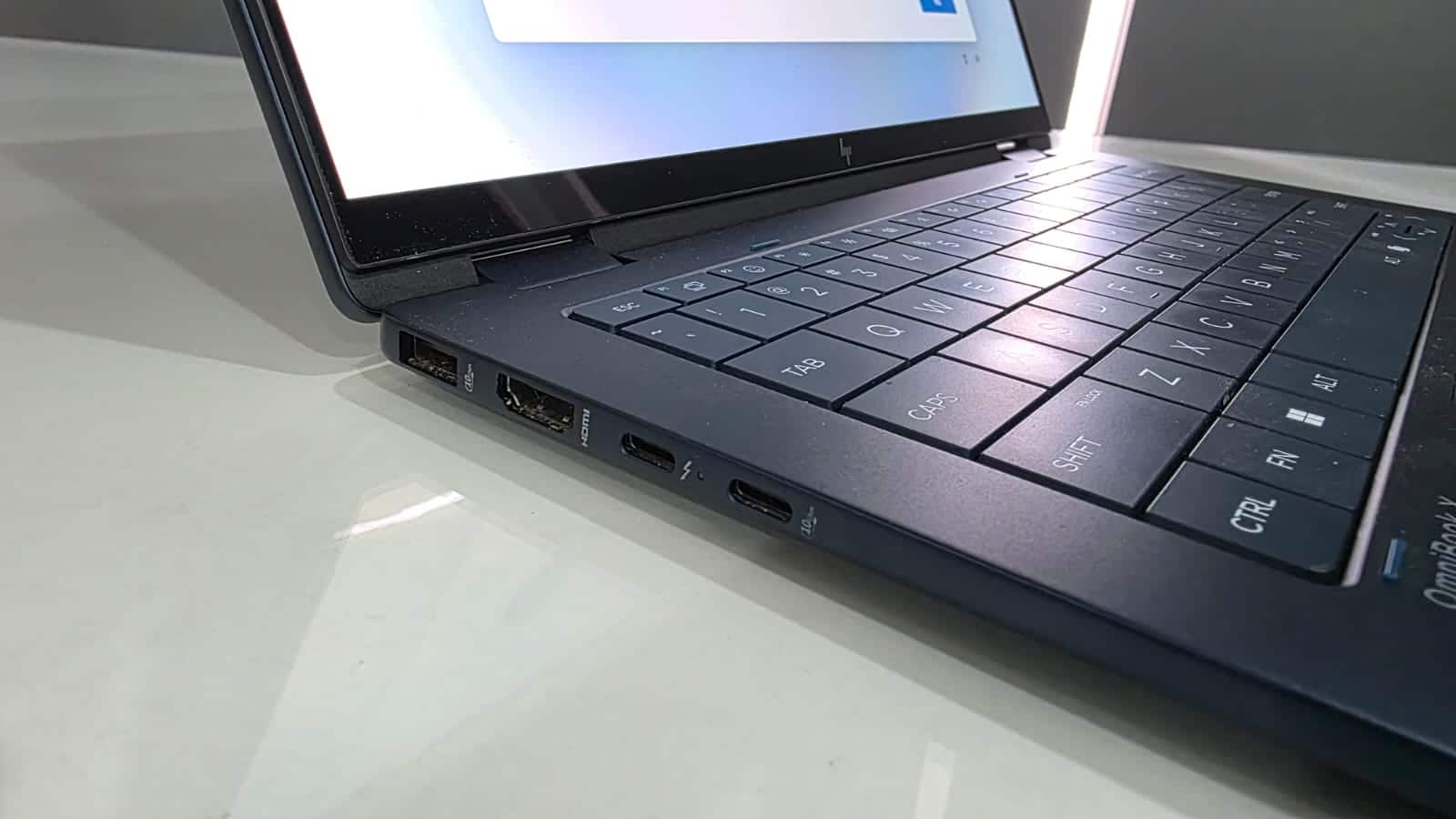
Despite the thin form factor, HP hasn’t compromised on I/O. The OmniBook X Flip features two USB-A ports, one HDMI 2.1, two USB-C ports (including one with Thunderbolt 4 support), and a 3.5mm audio jack. This setup allowed me to connect to an external 4K display, transfer files quickly from an SSD, and charge my phone—all without needing a dongle.
Wi-Fi 6E and Bluetooth 5.3 support also ensure future-proof wireless connectivity. File transfers and streaming over wireless networks were stable and speedy during my usage.HP OmniBook X Flip: Keyboard and touchpad
HP’s new lattice-less keyboard design is interesting in more ways than it looks. At first glance, the flat layout with minimal gaps between keys looks a little different, but in practice, it works quite well. The typing experience is precise, key travel is good and smooth like butter, and the larger key font makes it easier to spot symbols in dim environments. There’s also minimal flex on the deck, which adds to the overall sense of quality and inspires confidence in using it the way you want it to.
 HP Omnibook X Flip
The backlight levels are well-calibrated—bright enough for late-night typing without becoming too intrusive. HP gets the essentials right here, and the keyboard grows on you quickly.
The touchpad, however, presents a small hiccup in an otherwise polished input setup. It’s large, smooth, and handles gestures with ease, but the click zones are slightly misaligned. Left-clicking is fine, but the right-click area doesn’t always register as expected unless you’re very deliberate. It’s not a deal-breaker, but once you notice it, you don’t stop noticing it. Still, for most scrolls, taps, and swipes, it’s smooth sailing.
HP OmniBook X Flip: Performance and thermals
Under the hood, the HP OmniBook X Flip runs on Intel’s Core Ultra 7 258V processor. This chip is part of Intel’s Meteor Lake lineup, featuring a built-in NPU (Neural Processing Unit) designed specifically for handling AI workloads. Over the course of my usage, this translated to a consistent, responsive experience even when juggling multiple applications—think Chrome with 15+ tabs, Figma, Zoom, and Lightroom running in tandem.
With 1TB of fast PCIe Gen4 NVMe SSD storage and 16GB LPDDR5x RAM, file transfers, app launches, and multitasking felt instantaneous. The integrated Intel Arc graphics also pulls more weight than expected. Casual gaming is doable comfortably at 1080p and creative work, such as photo editing or rendering a short video, is just about alright.
What stands out more than raw power is how smartly the system adapts. HP’s Smart Sense mode automatically adjusts fan speeds and performance based on usage patterns. When I was typing or browsing, the fans stayed dead silent. During longer Zoom calls or light editing sessions, they’d spin up briefly and then fade away. The underside did get warm during heavier workflows, but not to the point where it felt uncomfortable on the lap.
The AI features integrated here don’t feel gimmicky—something I appreciated deeply. HP’s AI Companion, baked right into the system, helps with monitoring performance, suggesting optimisations, and even nudging you to switch to high-performance mode if it notices you’re plugged in and demanding more power. It’s subtle, contextual, and most importantly, skippable if you don’t want the help.
 HP Omnibook X Flip
Windows 11 Copilot integration is smooth, and the device feels like it’s built with Microsoft’s AI-first future in mind. Whether I was using voice inputs, search shortcuts, or assistance features, the OmniBook X Flip handled it with minimal lag. Offline AI features like Studio Effects for background blur or lighting adjustments in video calls also ran without taxing the CPU or killing battery life—thanks to that onboard NPU.
Audio quality, unfortunately, didn’t match the rest of the premium feel. The speakers are front-firing and support DTS X Ultra, but the output is anything but average. For this price, even the MacBook Air's speaker sounds super premium; let's not bring the MacBook Pro into the picture. However, they are okay for watching YouTube or casual streaming, but don’t expect room-filling sound or strong bass. HP would have pushed a bit more here, especially given how capable the display is. Most of my serious listening ended up happening through Bluetooth headphones.
HP OmniBook X Flip: Battery life and charging
Battery life on the OmniBook X Flip comfortably crosses the 7.5-hour mark with mixed usage. It's not bad as per Windows PC's standards. But in a broader perspective, the battery life could have been better. However, most users will be happy as the laptop can last for one day of office tenure.
Again, the battery life here could have been better for a laptop priced this premium and aimed at people on the go.
The 65W USB-C charger is compact and supports fast charging—HP claims 50% in 30 minutes, and in my tests, it came quite close. I was able to top up to nearly 55% in around 35 minutes from zero. There’s also an inbuilt Battery Health Manager which lets you limit charging to 80% to extend overall battery lifespan—great for users who keep their machines plugged in most of the time.\
Verdict
The HP OmniBook X Flip is one of those rare laptops that doesn’t try too hard to be something it’s not. It isn’t chasing gaming performance, nor does it obsess over minimalism to the point of cutting functionality. Instead, it quietly delivers on the things that matter—strong, efficient performance, a gorgeous and practical display, reliable battery life, and real flexibility.
Some areas could be better. The speaker performance feels underwhelming for a device in this price range, and the touchpad’s click alignment needs refinement. But the core experience remains consistently impressive.
If you’re someone who needs a laptop that’s just as comfortable in tablet mode on a couch as it is docked at a desk, or if you’re looking for an AI-ready machine that doesn’t compromise on the basics, the OmniBook X Flip is worth a serious look. It adapts, adjusts, and just works—quietly, intelligently, and reliably


Discover the latest Business News, Sensex, and Nifty updates. Obtain Personal Finance insights, tax queries, and expert opinions on Moneycontrol or download the Moneycontrol App to stay updated!

Find the best of Al News in one place, specially curated for you every weekend.
Stay on top of the latest tech trends and biggest startup news.